Authentication Methods#
Introduction#
Hopsworks can be configured to use different types of authentication methods. In this guide we will look at the different authentication methods available in Hopsworks.
Prerequisites#
Administrator account on a Hopsworks cluster.
Step 1: Go to Authentication methods page#
To configure Authentication methods click on your name in the top right corner of the navigation bar and choose Cluster Settings from the dropdown menu, then choose Authentication under Security & Access in the left sidebar.
Step 2: Configure Authentication methods#
On the Authentication configuration page you can configure how users authenticate. Each control is applied as soon as you change it, there is no save step.
- Hopsworks accounts: when checked, users can register and log in with credentials managed by Hopsworks itself.
- TOTP Two-factor Authentication: can be disabled, optional or mandatory. If set to mandatory all users are required to set up two-factor authentication when registering.
!!! note If two-factor is set to mandatory on a cluster with preexisting users all users will need to go through lost device recovery step to enable two-factor. So consider setting it to optional first and allow users to enable it before setting it to mandatory.
- OAuth2: if your organization already have an identity management system compatible with OpenID Connect (OIDC) you can configure Hopsworks to use your identity provider by ticking the OAuth checkbox. After enabling OAuth you can register your identity provider by clicking on Add Identity Provider button. See Create client for details.
- LDAP/Kerberos: if your organization is using LDAP or Kerberos to manage users and services you can configure Hopsworks to use it as the user management system. You can enable LDAP/Kerberos by ticking the LDAP/Kerberos checkbox and choosing LDAP or Kerberos. For more information on how to configure LDAP and Kerberos see Configure LDAP and Configure Kerberos.
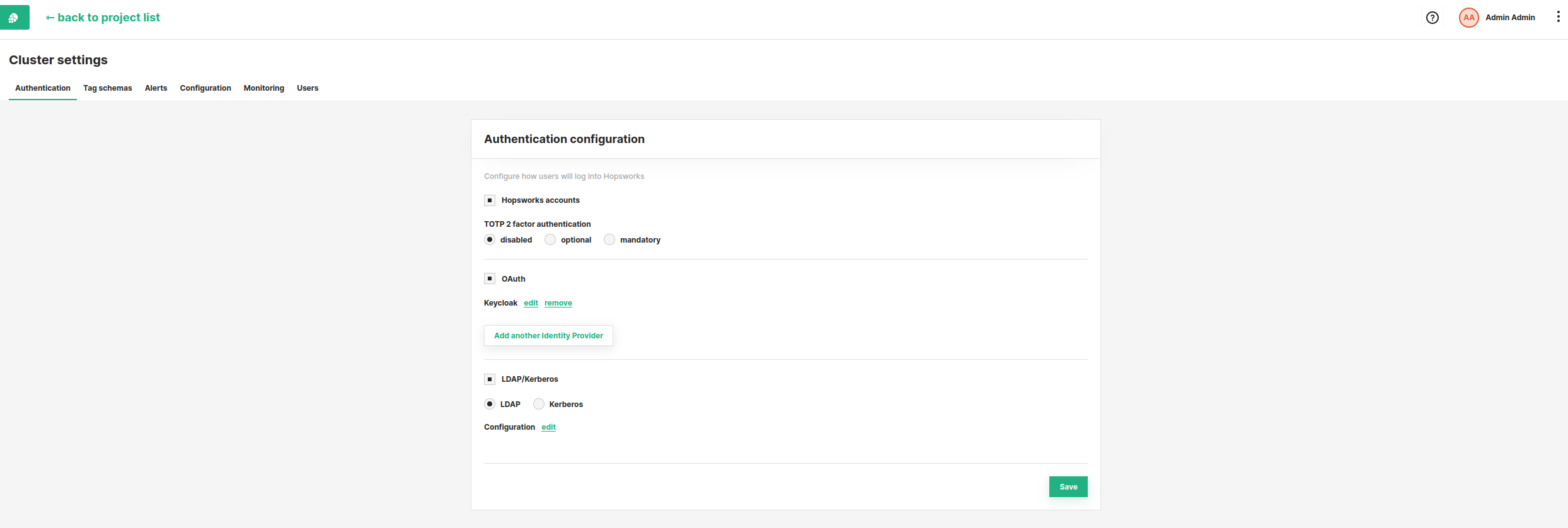
In the figure above we see a cluster with Hopsworks accounts enabled, Two-factor authentication disabled, and both OAuth and LDAP/Kerberos unchecked.