Disaster Recovery#
Backup#
The state of a Hopsworks cluster is split between data and metadata and distributed across multiple services. This section explains how to take consistent backups for the offline and online feature stores as well as cluster metadata.
In Hopsworks, a consistent backup should back up the following services:
- RonDB: cluster metadata and the online feature store data.
- HopsFS: offline feature store data plus checkpoints and logs for feature engineering applications.
- Opensearch: search metadata, logs, dashboards, and user embeddings.
- Superset: dashboards, charts, saved queries, database connections, and users and roles, stored in the Superset metadata database, which is a separate MySQL from RonDB.
- Kubernetes objects: cluster credentials, backup metadata, serving metadata, Trino authentication (password and group files plus the admin and monitoring credentials), and project namespaces with service accounts, roles, secrets, and configmaps.
- Python environments: custom project environments are stored in your configured container registry. Back up the registry separately. If a project and its environment are deleted, you must recreate the environment after restore.
Besides the above services, Hopsworks uses also Apache Kafka which carries in-flight data heading to the online feature store. In the event of a total cluster loss, running jobs with in-flight data must be replayed.
Prerequisites#
When enabling backup in Hopsworks, cron jobs are configured for RonDB and Opensearch. For HopsFS, backups rely on versioning in the object store. For Kubernetes objects, Hopsworks uses Velero to snapshot the required resources. Before enabling backups:
- Enable versioning on the S3-compatible bucket used for HopsFS.
- Install and configure Velero with the AWS plugin (S3).
Install Velero#
Velero provides backup and restore for Kubernetes resources. Install it with either the Velero CLI or Helm (Velero docs: Velero basic install guide).
- Using the Velero CLI, set up the CRDs and deployment:
velero install \
    --image velero/velero:v1.17.1 \
    --plugins velero/velero-plugin-for-aws:v1.13.0 \
    --no-default-backup-location \
    --no-secret \
    --use-volume-snapshots=false \
    --wait
- Using the Velero Helm chart:
helm repo add vmware-tanzu https://vmware-tanzu.github.io/helm-charts
helm repo update

helm install velero vmware-tanzu/velero \
  --namespace velero \
  --version 11.2.0 \
  --create-namespace \
  --set "initContainers[0].name=velero-plugin-for-aws" \
  --set "initContainers[0].image=velero/velero-plugin-for-aws:v1.13.0" \
  --set "initContainers[0].volumeMounts[0].mountPath=/target" \
  --set "initContainers[0].volumeMounts[0].name=plugins" \
  --set-json configuration.backupStorageLocation='[]' \
  --set "credentials.useSecret=false" \
  --set "snapshotsEnabled=false" \
  --wait
Configuring Backup#
Note
Backup is only supported for clusters that use S3-compatible object storage.
You can enable backups during installation or a later upgrade. Set the schedule with a cron expression in the values file:
After configuring backups, go to the cluster settings and choose Backup under Infrastructure in the left sidebar. You should see enabled at the top level and for all services if everything is configured correctly.
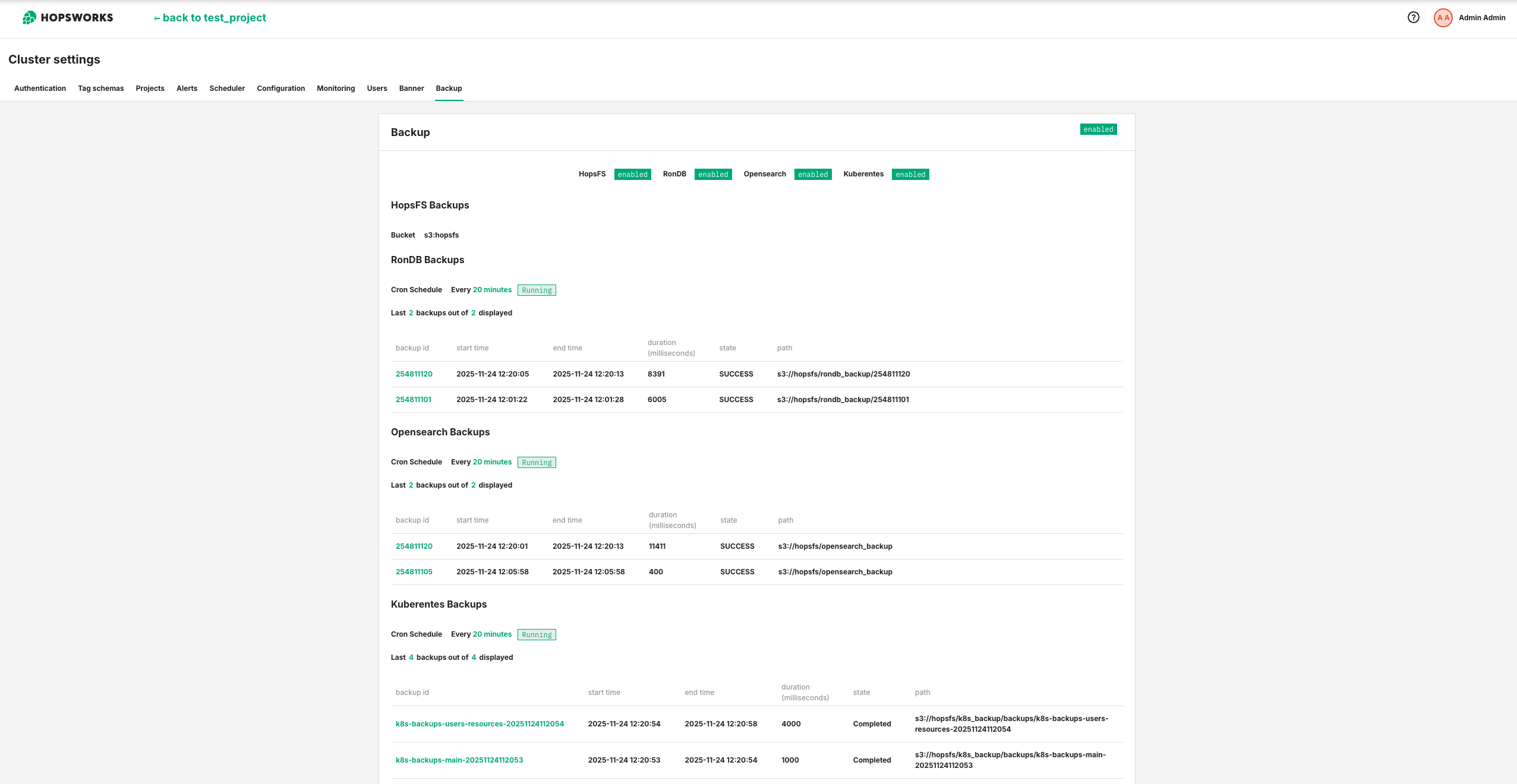
If any service is misconfigured, the backup status shows as partial. In the example below, Velero is disabled because it was not configured correctly. Fix partial backups before relying on them for recovery.

Cleanup#
Use the backup time-to-live (ttl) flag to automatically prune backups older than the configured duration.
For S3 object storage, you can also configure a bucket lifecycle policy to expire old object versions. Example for AWS S3:
{
"Rules": [
{
"ID": "HopsFSBlocksRetentionPolicy",
"Status": "Enabled",
"Filter": {},
"Expiration": {
"ExpiredObjectDeleteMarker": true
},
"NoncurrentVersionExpiration": {
"NoncurrentDays": 60
}
}
]
}
Superset#
Superset stores its state in its own MySQL database, which is separate from RonDB and is therefore not part of the RonDB backup. When backups are enabled, a create-superset-backup cron job takes a logical dump of the Superset database and uploads it to the same object storage as the other backups, under the superset_backup/<backup-id>/ prefix. The dump covers the whole superset schema, so it includes the database connections (connectors) along with dashboards, charts, saved queries, users and roles. That includes the connections Hopsworks creates itself, such as the per-project Trino connections, because they are rows in the same database. Connector credentials are stored encrypted with the Superset secret key, so they are only usable after a restore if that key is restored with the database, which is why the restore verifies it (see Superset restore). Each backup writes two objects: superset.sql.gz (the gzipped dump) and manifest.json (the dump checksum, the Superset image and schema version, and a fingerprint of the Superset secret key). The backup is also indexed in the superset-backups-metadata ConfigMap, which the Velero backup captures so the index is restored with the cluster.
Superset's Kubernetes Secrets are captured by the Velero backup through the backup.hops.works/include label:
superset-secret-key: the Superset secret key. It must be restored together with the database, because Superset uses it to encrypt the database-connection passwords stored in the metadata database, so restoring the database with a different secret key leaves those connections undecryptable.superset-mysql-users-secrets: the Superset MySQL credentials.superset-admin-credentials: the Superset admin account.
If you provide these Secrets yourself by setting superset.auth.createSecrets: false, you must add the label backup.hops.works/include: "true" to each of them, because the chart only labels the Secrets it creates and Velero selects Secrets by that label.
To list the Superset backups that were taken, read the metadata ConfigMap:
kubectl get configmap superset-backups-metadata -n hopsworks -o json \
| jq -r '.data | to_entries[] | select(.value | fromjson | .state == "SUCCESS") | .key' \
| sort -r
Note
Backups taken before Superset backup was enabled do not contain Superset. Restoring from such a backup recovers the rest of the cluster but not Superset dashboards, charts, or users.
Trino authentication#
Trino authenticates users against a password file and authorizes them against a group file. Both files, together with the Trino admin and monitoring credentials, live in Kubernetes Secrets that are labelled so the k8s-backups-main Velero schedule captures them. They are therefore included in the Kubernetes-objects backup and no extra configuration is required.
After a restore, Hopsworks rebuilds the Trino password and group files from the restored RonDB state. The rebuild runs on the primary backend instance shortly after startup and then periodically, so an existing project user can authenticate to Trino and holds exactly the access their restored project role grants. This means a restore recovers Trino authentication automatically, without an operator step.
Note
This holds for backups taken after this feature was deployed. A backup taken before it does not contain the Trino Secrets, because they were not yet labelled for the k8s-backups-main schedule, and an existing cluster first has such a backup only after its next backup cycle. Restoring from an older backup still recovers all RonDB-derived authentication, because the reconciliation rebuilds the project users, their role groups, and the shared-dataset groups from the restored RonDB state. It does not recover the admin and monitoring credential entries: those are re-rendered from the chart values on a fresh install, so any out-of-band rotation of them is lost and Prometheus may need its Trino monitoring credentials re-aligned.
The Trino internal shared secret is deliberately not backed up. It has no coupling to user state and is regenerated on a fresh install, and restoring an old value onto a running cluster would break Trino internal communication until every Trino pod restarts. If you set createSharedSecret: false and manage this secret yourself, restore it from your own source and then restart all Trino pods together so the coordinator and workers share the same value.
Warning
The backup contains the Trino admin credentials, which are only base64-encoded at the Kubernetes layer. Restrict access to the backup object store and enable encryption at rest so the backup does not expose usable credentials.
Note
On ArgoCD-managed clusters with automated self-healing, add ignoreDifferences on the data field of the four Trino auth Secrets (trino-password-file, trino-groups-file, trino-admin-credentials, trino-monitoring-credentials) and set RespectIgnoreDifferences=true in the Application sync options. Hopsworks writes project users and groups into these Secrets at runtime, so without this ArgoCD reapplies the chart defaults on every sync and overwrites the restored authentication data.
Restore#
Hopsworks supports two restore modes:
- New cluster restore: Install a fresh cluster and restore data from a backup during installation.
- In-place restore: Restore data onto an existing running cluster via
helm upgrade.
Note
Use the exact Hopsworks version that was used to create the backup.
New Cluster Restore#
The new cluster restore process has two phases:
- Restore Kubernetes objects required for the cluster restore.
- Install the cluster with Helm using the correct backup IDs.
Restore Kubernetes objects#
Restore the Kubernetes objects that were backed up using Velero.
- Ensure that Velero is installed and configured with the AWS plugin as described in the prerequisites.
-
Set up a Velero backup storage location to point to the S3 bucket.
-
If you are using AWS S3 and access is controlled by an IAM role:
-
If you are using an S3-compatible object storage, provide credentials and endpoint:
cat << EOF > hopsworks-bsl-credentials [default] aws_access_key_id=YOUR_ACCESS_KEY aws_secret_access_key=YOUR_SECRET_KEY EOF kubectl create secret generic -n velero hopsworks-bsl-credentials --from-file=cloud=hopsworks-bsl-credentials kubectl apply -f - <<EOF apiVersion: velero.io/v1 kind: BackupStorageLocation metadata: name: hopsworks-bsl namespace: velero spec: provider: aws config: region: REGION s3Url: ENDPOINT credential: key: cloud name: hopsworks-bsl-credentials objectStorage: bucket: BUCKET_NAME prefix: k8s_backup EOF -
After the backup storage location becomes available, restore the backups. The following script restores the latest available backup. To restore a specific backup, set
backupNameinstead ofscheduleName.
echo "=== Waiting for Velero BackupStorageLocation hopsworks-bsl to become Available ==="
until [ "$(kubectl get backupstoragelocations hopsworks-bsl -n velero -o jsonpath='{.status.phase}' 2>/dev/null)" = "Available" ]; do
echo "Still waiting..."; sleep 5;
done
echo "=== Waiting for Velero to sync the backups from hopsworks-bsl ==="
until [ "$(kubectl get backups -n velero -ojson | jq -r '[.items[] | select(.spec.storageLocation == "hopsworks-bsl")] | length' 2>/dev/null)" != "0" ]; do
echo "Still waiting..."; sleep 5;
done
# Restores the latest - if specific backup is needed then backupName instead
echo "=== Creating Velero Restore object for k8s-backups-main ==="
kubectl apply -f - <<EOF
apiVersion: velero.io/v1
kind: Restore
metadata:
name: k8s-backups-main
namespace: velero
spec:
scheduleName: k8s-backups-main
EOF
echo "=== Waiting for Velero restore to finish ==="
until [ "$(kubectl get restore k8s-backups-main -n velero -o jsonpath='{.status.phase}' 2>/dev/null)" = "Completed" ]; do
echo "Still waiting..."; sleep 5;
done
# Restores the latest - if specific backup is needed then backupName instead
echo "=== Creating Velero Restore object for k8s-backups-users-resources ==="
kubectl apply -f - <<EOF
apiVersion: velero.io/v1
kind: Restore
metadata:
name: k8s-backups-users-resources
namespace: velero
spec:
scheduleName: k8s-backups-users-resources
EOF
echo "=== Waiting for Velero restore to finish ==="
until [ "$(kubectl get restore k8s-backups-users-resources -n velero -o jsonpath='{.status.phase}' 2>/dev/null)" = "Completed" ]; do
echo "Still waiting..."; sleep 5;
done
After the restore completes, verify the restored resources in Kubernetes. RonDB and Opensearch store their backup metadata in the rondb-backups-metadata and opensearch-backups-metadata configmaps. Use the commands below to list successful backup IDs (newest first) that can be referenced during cluster installation.
kubectl get configmap rondb-backups-metadata -n hopsworks -o json \
| jq -r '.data | to_entries[] | select(.value | fromjson | .state == "SUCCESS") | .key' \
| sort -nr
kubectl get configmap opensearch-backups-metadata -n hopsworks -o json \
| jq -r '.data | to_entries[] | select(.value | fromjson | .state == "SUCCESS") | .key' \
| sort -nr
Restore on Cluster installation#
To restore a cluster during installation, configure the backup ID in the values YAML file:
global:
  _hopsworks:
    backups:
      enabled: true
      schedule: "@weekly"
restoreFromBackup:
backupId: "254811200"
Customizations#
Warning
Even if you override the backup IDs for RonDB and Opensearch, you must still set .global._hopsworks.restoreFromBackup.backupId to ensure HopsFS is restored.
To restore a different backup ID for RonDB:
global:
_hopsworks:
backups:
enabled: true
schedule: "@weekly"
restoreFromBackup:
backupId: "254811200"
rondb:
rondb:
restoreFromBackup:
backupId: "254811140"
To restore a different backup for Opensearch:
global:
_hopsworks:
backups:
enabled: true
schedule: "@weekly"
restoreFromBackup:
backupId: "254811200"
olk:
opensearch:
restore:
repositories:
default:
snapshots:
default:
snapshot_name: "254811140"
You can also customize the Opensearch restore process to skip specific indices:
global:
_hopsworks:
backups:
enabled: true
schedule: "@weekly"
restoreFromBackup:
backupId: "254811200"
olk:
opensearch:
restore:
repositories:
default:
snapshots:
default:
snapshot_name: "254811140"
payload:
indices: "-myindex"
In-Place Restore#
Note
In-place restore is available from Hopsworks version 4.8.0.
In-place restore allows you to restore data onto an existing running cluster using helm upgrade. Unlike a new cluster restore, this does not require provisioning a fresh cluster: the existing stateful services are shut down, wiped if necessary, and restored from backup.
Warning
In-place restore replaces all existing data in the cluster with the backup data. Any data written after the backup was taken will be lost.
Info
After a fresh install from backup (new cluster restore), in-place restores can only be performed using backups taken after that fresh install, because the cluster certificates are regenerated during installation. To restore to a backup that was taken before the fresh install, you must perform another new cluster restore from that backup instead of an in-place restore.
In-place restore prerequisites#
- A running Hopsworks cluster deployed via Helm.
- A previously created backup with a known backup ID.
- Object storage configured and accessible with the backup data.
- Velero installed and configured as described in the prerequisites.
Identify the backup ID#
Get the backup ID from the Cluster Settings > Backup page or by using the following commands.
# RonDB backup IDs (newest first)
kubectl get configmap rondb-backups-metadata -n hopsworks -o json \
| jq -r '.data | to_entries[] | select(.value | fromjson | .state == "SUCCESS") | .key' \
| sort -nr
# Opensearch backup IDs (newest first)
kubectl get configmap opensearch-backups-metadata -n hopsworks -o json \
| jq -r '.data | to_entries[] | select(.value | fromjson | .state == "SUCCESS") | .key' \
| sort -nr
# Velero backup IDs for the main schedule (newest first)
kubectl get backups -n velero -o json \
| jq -r '[.items[] | select(.spec.storageLocation == "hopsworks-bsl" and .metadata.labels["velero.io/schedule-name"] == "k8s-backups-main" and .status.phase == "Completed")] | sort_by(.status.completionTimestamp) | reverse[] | .metadata.name'
# Velero backup IDs for the users schedule (newest first)
kubectl get backups -n velero -o json \
| jq -r '[.items[] | select(.spec.storageLocation == "hopsworks-bsl" and .metadata.labels["velero.io/schedule-name"] == "k8s-backups-users-resources" and .status.phase == "Completed")] | sort_by(.status.completionTimestamp) | reverse[] | .metadata.name'
Run the in-place restore#
Configure the restore in the values file and run helm upgrade:
global:
_hopsworks:
backups:
enabled: true
schedule: "@weekly"
restoreFromBackup:
backupId: "254811200"
inPlace: true
forceDataClear: true
# Optional: specify Velero backup IDs. If not set, the latest completed backup is used.
hopsworks:
velero:
restore:
mainScheduleBackupId: "k8s-backups-main-20260213T153627Z"
usersScheduleBackupId: "k8s-backups-users-resources-20260213T153627Z"
Then run:
helm upgrade hopsworks hopsworks/hopsworks --version <CHART_VERSION> \
--namespace hopsworks \
-f values.yaml \
--timeout 1200s
You can also pass the restore flags directly on the command line:
helm upgrade hopsworks hopsworks/hopsworks --version <CHART_VERSION> \
--namespace hopsworks \
--set-string global._hopsworks.restoreFromBackup.backupId="254811200" \
--set global._hopsworks.restoreFromBackup.inPlace=true \
--set global._hopsworks.restoreFromBackup.forceDataClear=true \
--set-string hopsworks.velero.restore.mainScheduleBackupId="k8s-backups-main-20260213T153627Z" \
--set-string hopsworks.velero.restore.usersScheduleBackupId="k8s-backups-users-resources-20260213T153627Z" \
--timeout 1200s
The required flags are:
| Parameter | Description |
|---|---|
global._hopsworks.restoreFromBackup.backupId | The backup ID to restore from. |
global._hopsworks.restoreFromBackup.inPlace | Must be true to enable in-place restore mode. |
global._hopsworks.restoreFromBackup.forceDataClear | Must be true to confirm that existing data will be replaced. This is a safety mechanism to prevent accidental data loss. |
The following flags are optional. If not set, the latest available Velero backup will be used:
| Parameter | Description |
|---|---|
hopsworks.velero.restore.mainScheduleBackupId | The Velero backup ID for the main schedule (k8s-backups-main). |
hopsworks.velero.restore.usersScheduleBackupId | The Velero backup ID for the users schedule (k8s-backups-users-resources). |
Important
After a successful restore, remove the restoreFromBackup blocks from your values file and run helm upgrade to apply the change. If left in place, these blocks can cause subsequent upgrades to fail or behave unexpectedly.
Re-running an in-place restore#
In-place restore creates marker resources to prevent accidental re-runs. If you need to run the restore again with the same backup ID, delete the marker resources first:
# Delete the HopsFS restore job
kubectl delete job hopsfs-inplace-restore-<BACKUP_ID> -n hopsworks --ignore-not-found=true
# Delete the RonDB restore jobs
kubectl delete job restore-native-backup-<BACKUP_ID> -n hopsworks --ignore-not-found=true
kubectl delete job setup-mysqld-dont-remove-<BACKUP_ID> -n hopsworks --ignore-not-found=true
# Delete the Opensearch restore job
kubectl delete job opensearch-restore-default-default-<BACKUP_ID> -n hopsworks --ignore-not-found=true
# Delete the velero restore objects, use the exact backup name or schedule name
kubectl delete restore.velero.io k8s-backups-main -n velero --ignore-not-found=true
kubectl delete restore.velero.io k8s-backups-users-resources -n velero --ignore-not-found=true
In-place restore customizations#
The same customization options for RonDB and Opensearch backup IDs apply to in-place restore. You can override individual service backup IDs while keeping the global backup ID for HopsFS.
OpenSearch crash-loops after a restore on 5.2.0 and 5.2.1#
On 5.2.0 and 5.2.1, an OpenSearch snapshot restore, in place or during a fresh install, can leave the .opendistro_security index closed. 5.1.2 runs the same restore Job; the crash-loop was not verified there. The restore Job closes that index without restoring it, and when OpenSearch restarts while the Job reopens the indices, the Job still completes with the index closed. From then on every OpenSearch start fails to apply the security configuration and exits: opensearch-0 crash-loops and OpenSearch Dashboards stays down. The restore Job of 5.1.3, 5.2.2 and later leaves that index open.
The symptom:
kubectl logs -n hopsworks opensearch-0 -c opensearch --previous \
| grep -E 'index_closed_exception|securityadmin push failed'
Each start answers HTTP for a few seconds before it exits. Reopen the index in that window with the admin certificate, and the start that the request reaches then applies the security configuration and becomes Ready. With more than one OpenSearch node, only the pod that applies the configuration crash-loops while the others stay Ready, and the same _open request sent through one of them needs no timing.
until kubectl exec -n hopsworks opensearch-0 -c opensearch -- bash -c '
cd /usr/share/opensearch/config/certs-admin
for i in $(seq 1 240); do
code=$(curl -sk -o /dev/null -w "%{http_code}" -X POST \
--cert elkadmin_certificate_bundle.pem --key elkadmin_priv.pem \
https://localhost:9200/.opendistro_security/_open)
if [ "$code" = 200 ]; then exit 0; fi
sleep 0.5
done
exit 1'; do sleep 2; done
The indices the Job had not reopened yet are still closed. Once opensearch-0 is Ready, list them and reopen the ones the restore closed; an index you closed on purpose before the restore is listed too.
kubectl exec -n hopsworks opensearch-0 -c opensearch -- bash -c '
cd /usr/share/opensearch/config/certs-admin
curl -sk --cert elkadmin_certificate_bundle.pem --key elkadmin_priv.pem \
"https://localhost:9200/_cat/indices?h=index,status" | grep " close$"'
kubectl exec -n hopsworks opensearch-0 -c opensearch -- bash -c '
cd /usr/share/opensearch/config/certs-admin
curl -sk --cert elkadmin_certificate_bundle.pem --key elkadmin_priv.pem \
-X POST "https://localhost:9200/<index>/_open"'
The commands use the elkadmin certificate, the default olk.opensearch.security.admin_locality. Then check that the security configuration was applied, as described in Security configuration.
Superset restore#
Superset is restored by reloading its database from a backup (see Superset backup). Nothing may write the database while it is reloaded, so the restore is a two-step operation: hold Superset at zero replicas and reload, then start it again.
Find the Superset backup id to restore:
kubectl get configmap superset-backups-metadata -n hopsworks -o json \
| jq -r '.data | to_entries[] | select(.value | fromjson | .state == "SUCCESS") | .key' \
| sort -r
Set the restore trigger, add the chart's values.superset-restore.yaml, which pins every Superset workload to zero replicas, and run helm upgrade:
global:
_hopsworks:
restoreFromBackup:
superset:
enabled: true
backupId: "20260722215632-2116913658"
# Recorded in the audit trail. Defaults to helm/<release>@rev<revision>.
initiatedBy: "ops:HWORKS-2973 alice"
helm upgrade hopsworks hopsworks/hopsworks --version <CHART_VERSION> \
--namespace hopsworks \
-f values.yaml \
-f values.superset-restore.yaml \
--timeout 1200s
The chart refuses to render the restore without the overlay: zero replicas has to be the desired state for the whole window, which is what keeps the barrier in place under both Helm and ArgoCD. It also refuses when Superset itself is not installed, rather than reporting success for a recovery that would restore nothing. The Superset init Job is skipped while the flag is set, so no schema work runs during the reload.
The superset-restore-<BACKUP_ID> Job waits for the Superset pods to terminate, verifies the dump against its manifest (backup id, object path, size and sha256), waits until the live superset-secret-key matches the fingerprint recorded at backup time, and reloads the database. The fingerprint check is what makes the stored database connections usable afterwards: Superset encrypts their passwords with the secret key, so a database restored under a different key would leave every connection present but undecryptable. On a fresh cluster the key arrives with the platform Velero restore, and the Job waits for it (up to 30 minutes) rather than failing.
Follow the Job and confirm it completed:
kubectl logs -f job/superset-restore-<BACKUP_ID> -n hopsworks
kubectl get job superset-restore-<BACKUP_ID> -n hopsworks
Then remove the overlay and clear the flag to start Superset again:
helm upgrade hopsworks hopsworks/hopsworks --version <CHART_VERSION> \
  --namespace hopsworks \
  -f values.yaml \
  --timeout 1200s
This second step is required: it is what returns the Superset workloads to their normal replica counts. The init Job runs on this upgrade and migrates the restored schema forward with superset db upgrade, as it does after an image upgrade, so a backup taken by an older Superset version is brought up to the running image. A backup taken by a newer Superset than the running image cannot be migrated down; the init Job fails with an Alembic error and the upgrade reports it.
Audit trail and the backup fence#
Every restore appends to the superset-restore-audit ConfigMap: one entry per step (start, pods stopped, manifest verified, database reloaded, or the abort reason), each recording the time, the backup id and the initiator. The ConfigMap is retained across upgrades and carries the backup.hops.works/include label, so Velero captures it and the record survives the cluster it describes. The newest 50 entries are kept. The recorded initiator is deployment metadata, not an authenticated identity; correlate it with the Kubernetes audit log entry for the Helm or ArgoCD change to identify the actor.
kubectl get configmap superset-restore-audit -n hopsworks -o json \
| jq -r '.data | to_entries | map(select(.key|startswith("h-"))) | sort_by(.key) | .[].value'
The same ConfigMap carries the fence: while a restore is running, or after one has failed, its inProgress key holds the backup id and scheduled Superset backups skip their run, so a half-reloaded database is never captured as a backup. A completed restore clears it. After a failed restore, verify or recover the database, then clear the fence:
kubectl patch configmap superset-restore-audit -n hopsworks --type json \
  -p '[{"op":"remove","path":"/data/inProgress"}]'
To run the same restore again, delete its Job first; the chart refuses to render a restore whose Job already exists:
A retry, whether by the Job's own back-off or by hand, repeats every step. That is safe because the reload drops and recreates the schema, and the fence stays set from the first attempt until a reload succeeds.
Fresh-cluster restore#
On a brand-new cluster the sequence is the same two steps, with helm install in place of the first helm upgrade:
- Restore the platform Velero backup so the Superset Secrets (including
superset-secret-key) exist on the new cluster. - Install (or sync) the chart with the Superset restore flag set and
values.superset-restore.yamladded. The Job reloads the database into the freshly created MySQL while Superset is held at zero replicas. - Wait for the
superset-restore-<BACKUP_ID>Job to complete. - Remove the overlay, set
enabled: falseand upgrade, so Superset starts against the restored database and the init Job migrates the schema.
If step 1 is skipped, the Job waits for the secret key and then fails with the mismatch recorded in the audit trail; nothing has been written to the database at that point.
Limitations#
- The Superset restore is a logical reload of the metadata database, not a point-in-time snapshot coordinated with the RonDB or HopsFS backups. The Superset backup and the platform backup are taken independently, so a restore recovers each service to its own most recent backup, not to a single consistent instant across services.
- The Superset MySQL credentials (
superset-mysql-users-secrets) and the admin account (superset-admin-credentials) are fixed at install and are captured and restored as-is from the Velero backup. Rotating them is not supported for the lifetime of any cluster you intend to restore in place: an in-place restore rolls the Secrets back to the backed-up values, which would then be out of sync with the live MySQL grants written after a rotation. If a rotation is unavoidable, treat it as a re-baseline: rotate, then take a fresh backup, and discard backups taken before the rotation. - Enabling the Superset restore has no effect unless Superset itself is enabled (
global._hopsworks.superset.enabled=true), and the restore reloads the bundled MySQL, sosuperset.mysql.enabledmust be true (the chart rejects the restore at render time otherwise). - The restore does not flush Superset's Redis cache. Cached chart data and query results expire on their configured timeout, so entries cached before the restore may be served until then.
- Connectors are restored as rows with their credentials, and the restore verifies that the secret key matches the backup so those credentials remain decryptable. What it cannot guarantee is that a credential is still the right one, for connectors whose password is owned by another service. The per-project Trino connections are the case that matters: Hopsworks stores each user's Trino password in its own secret store in RonDB, rebuilds the Trino password file from RonDB, and copies that same password into the Superset connection. So the Superset side holds a copy, and RonDB is the source of truth. If Superset and RonDB are restored to the same point, the copy matches and the connection works. If they are restored to different points, and that user's secret was recreated in between (which happens when a user is removed from a project and added again), the restored Superset connection carries a password Trino no longer accepts. The certificate material Superset uses to reach Trino is a CA bundle for verifying Trino's server certificate, not a credential, so its reissue by the certs-operator is expected and harmless.
- A stale connector password does not repair itself, because Hopsworks only creates a connection when one is absent and skips when it already exists. After a fresh-cluster restore, confirm Trino access by opening a Trino-backed chart or running a query through a per-project Trino connection. If a user's Trino connection fails to authenticate, delete that connection in Superset and let Hopsworks recreate it from the current RonDB secret. A restored connection that decrypts is not proof that it still authenticates: the decryption only shows the secret key came back, while the password inside is a copy of a secret owned by RonDB. Run a query to confirm it.
ArgoCD#
The Superset Secrets (superset-secret-key, superset-mysql-users-secrets, superset-admin-credentials) are generated once and preserved across upgrades using a lookup that returns nothing during an offline helm template. Under ArgoCD, which renders with helm template, a sync can regenerate these Secrets and overwrite the values a Velero restore put back, which would leave the restored database's encrypted connections undecryptable. Add an ignoreDifferences entry so ArgoCD ignores their data, and the RespectIgnoreDifferences=true sync option so it does not re-apply the rendered values during sync. By default ignoreDifferences only affects the diff ArgoCD shows; without RespectIgnoreDifferences=true a sync still applies the freshly-rendered Secret values and overwrites the restored ones:
spec:
  syncPolicy:
    syncOptions:
      - RespectIgnoreDifferences=true
  ignoreDifferences:
    - group: ""
      kind: Secret
      name: superset-secret-key
      jsonPointers: ["/data"]
    - group: ""
      kind: Secret
      name: superset-mysql-users-secrets
      jsonPointers: ["/data"]
    - group: ""
      kind: Secret
      name: superset-admin-credentials
      jsonPointers: ["/data"]
The zero-replica barrier is declarative: with values.superset-restore.yaml among the Application's value files, helm template renders every Superset workload at zero replicas, so that is the desired state and self-heal maintains it rather than fighting it. No auto-sync pause is needed during the reload. The two steps map directly to two syncs: add the overlay and the flag and sync (the Job reloads the database while Superset is held at zero), then remove both and sync (the workloads return to their normal replica counts and the init Job migrates the schema). Do not remove the overlay until the restore Job has completed.