Query Engine (Trino)#
As a Hopsworks administrator, you can monitor and manage the Trino cluster used for query execution across all projects. The admin interface provides cluster-wide visibility into resources, performance, and worker health.
Cluster Overview#
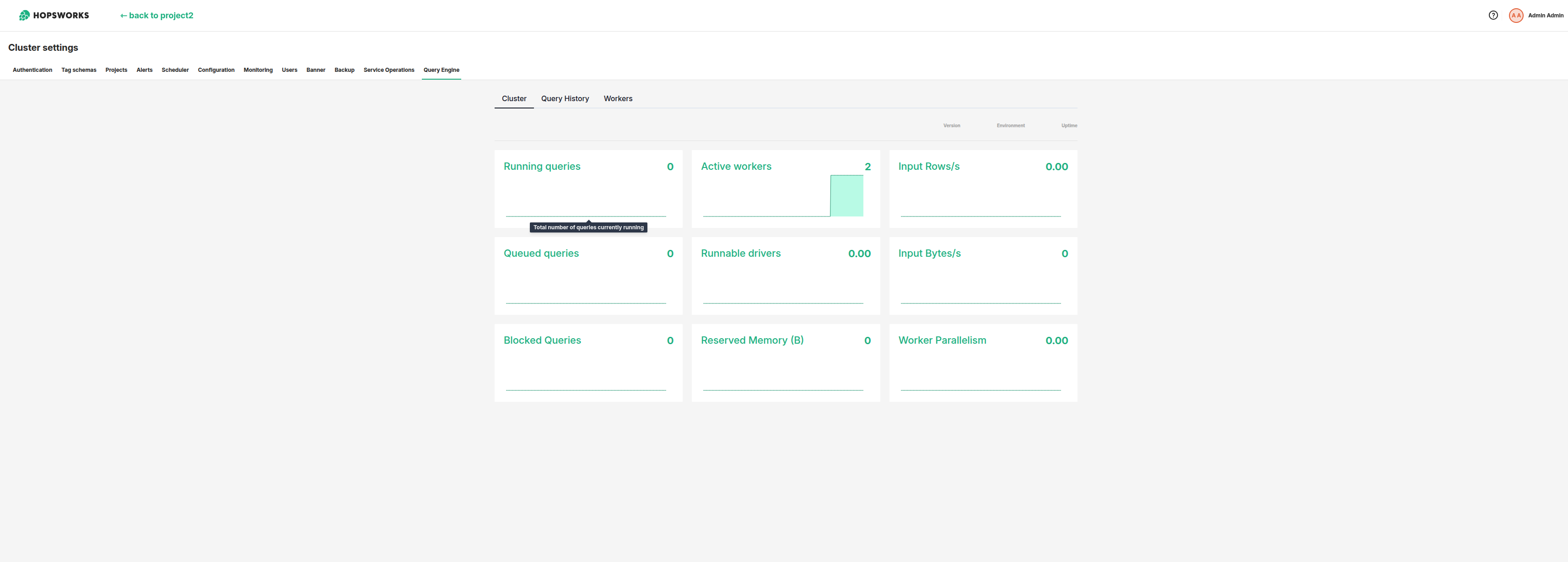
The cluster overview provides a comprehensive view of your Trino deployment, including:
- Cluster status: Overall health and availability
- Active queries: Total number of running queries across all projects
- Worker nodes: Number of active and total workers
- Resource utilization: Cluster-wide CPU and memory usage
- Query throughput: Average query execution times and data processed
Use this dashboard to monitor overall cluster health and identify capacity issues.
Query History#
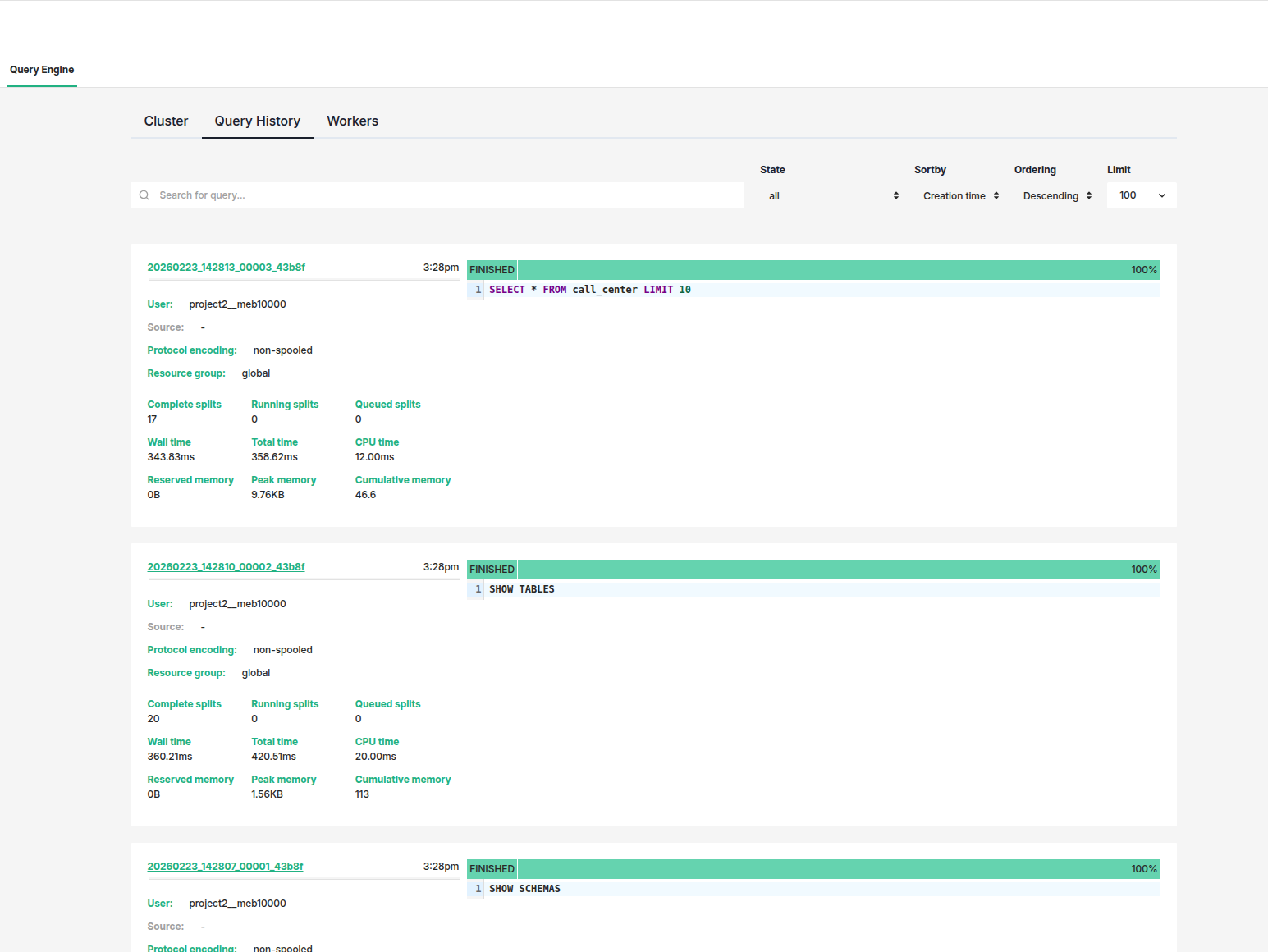
The query history shows all queries executed across the Trino cluster, regardless of project. This centralized view helps administrators:
- Monitor usage patterns: Identify peak usage times and resource-intensive queries
- Troubleshoot issues: Investigate failed or slow queries
- Audit activity: Track query execution by project and user
- Optimize performance: Identify queries that may need optimization
Each query entry displays:
- Query ID and text
- Project and user who executed it
- Status (running, completed, failed)
- Execution time and resources consumed
- Timestamp
Click any query to view detailed execution information.
Managing Workers#
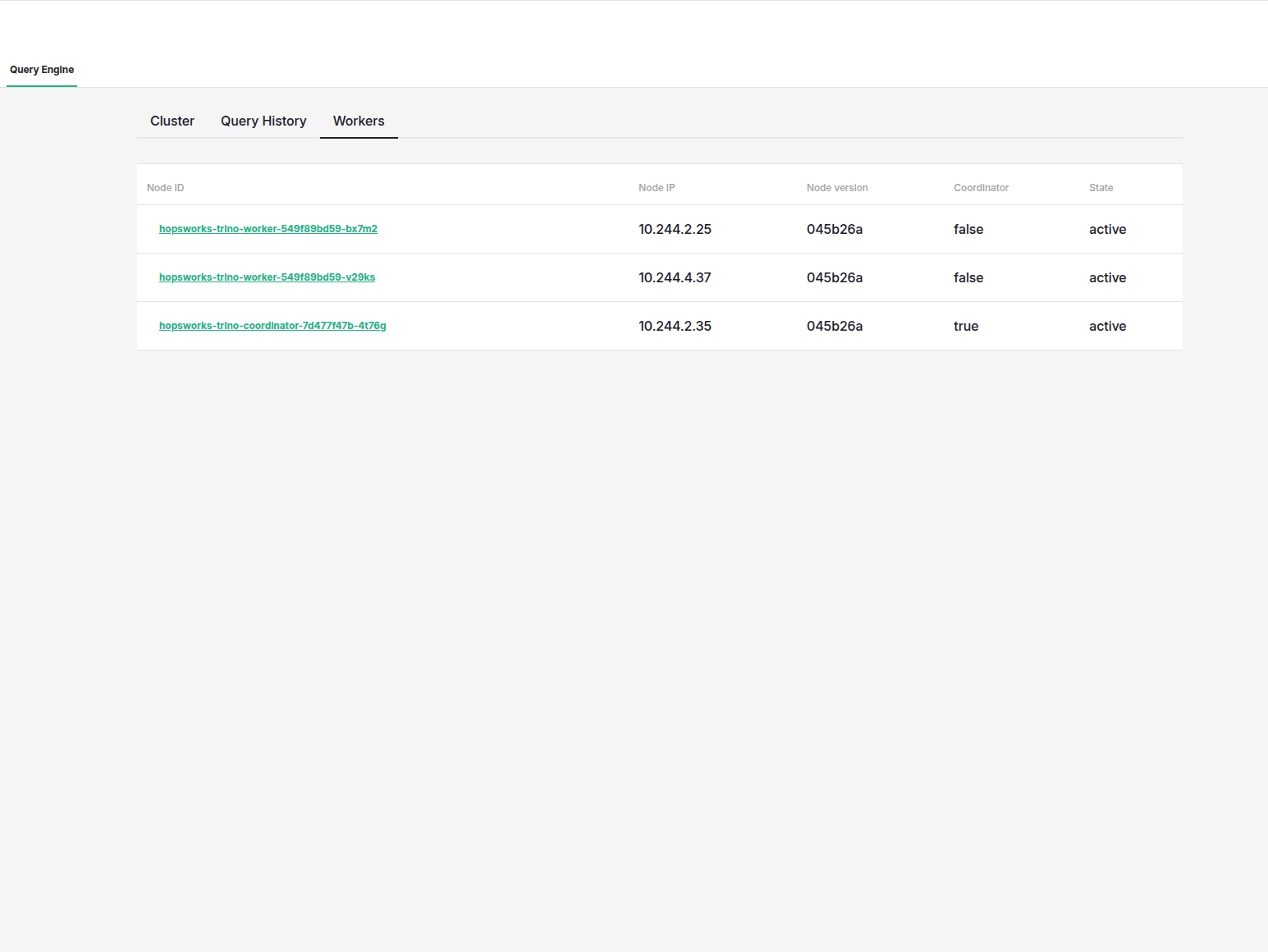
The workers view displays all Trino nodes in the cluster. For each node, you can see:
- Node IP: IP address of the worker node
- Node version: Trino version running on the node
- Coordinator or worker: Role of the node (coordinator or worker)
- State: Current state of the node (active, idle, or offline)
This view helps you monitor the cluster topology and identify any nodes that may be offline or experiencing issues.
Worker Status Details#
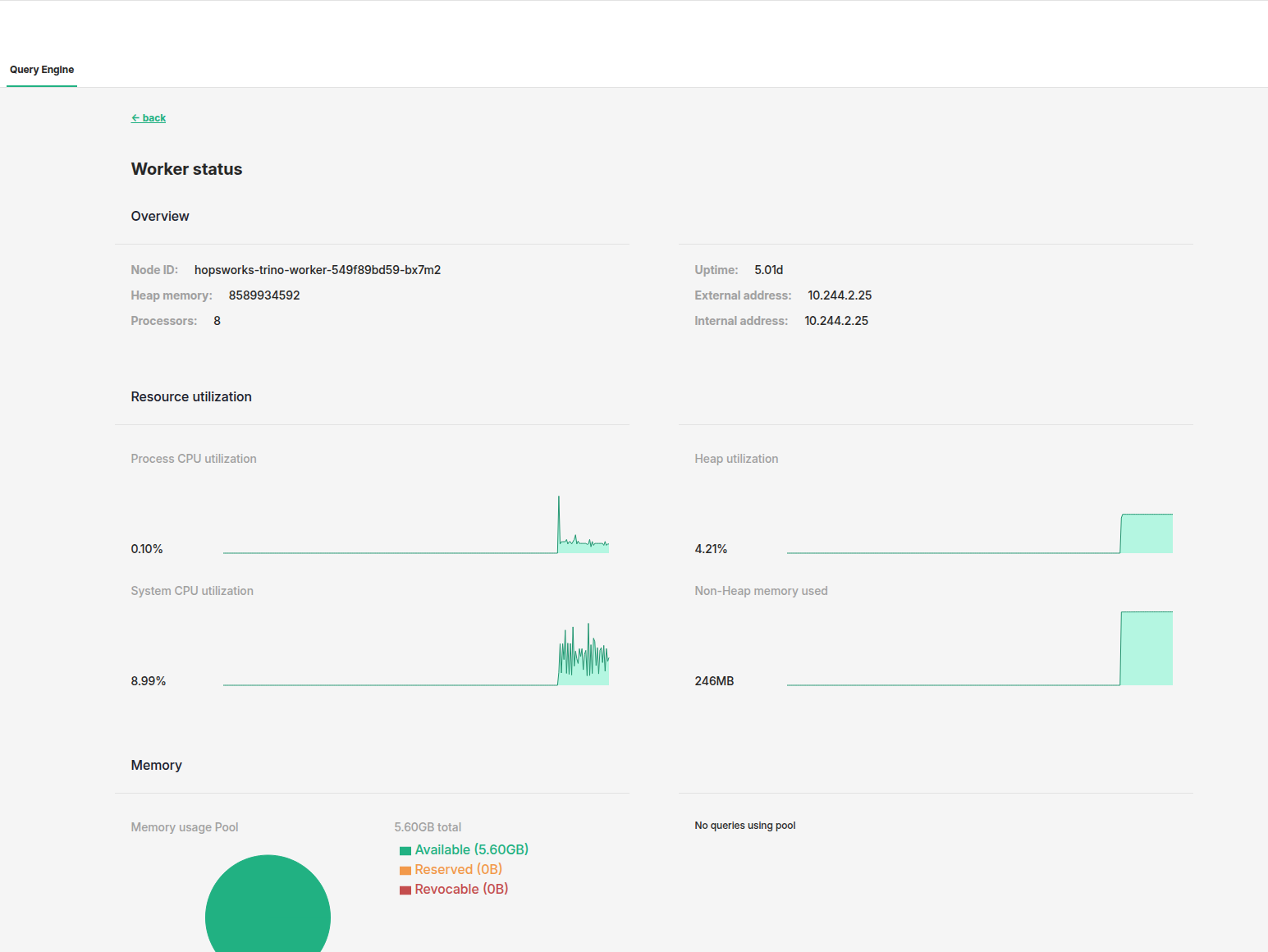
Click on a worker to view detailed status information:
- Resource metrics: Detailed CPU, memory, and network usage over time
- Task breakdown: Types and number of tasks being executed
- Error logs: Any errors or warnings from the worker
- Configuration: Worker settings and assigned resources
- Performance history: Historical performance trends
Use this detailed view to diagnose worker-specific issues and optimize resource allocation.
Managing Catalogs#
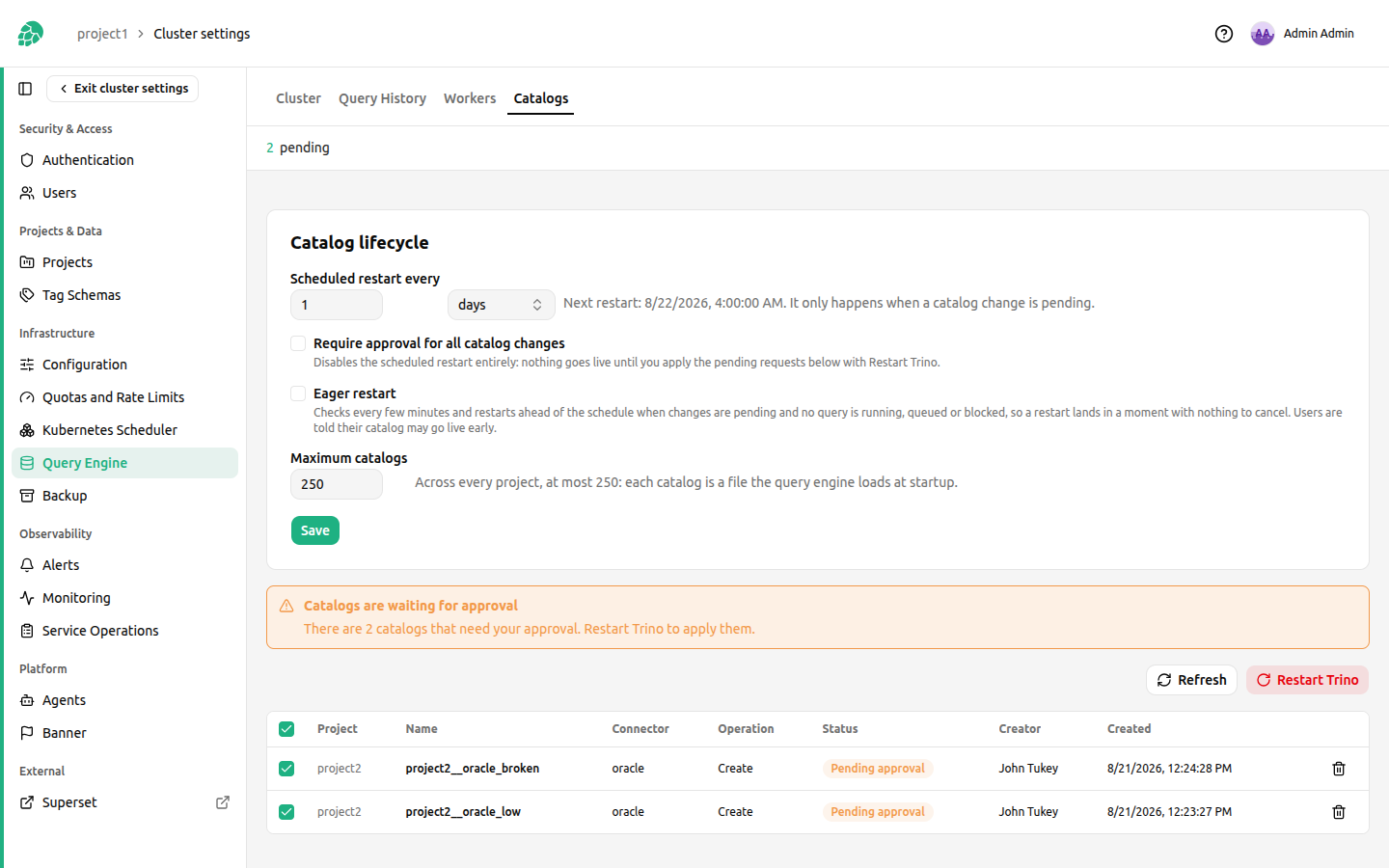
Catalogs created by project Data Owners are saved to the database but are not loaded by the running cluster until they are applied. Two things apply them: the scheduled restart, which needs no administrator, and the Catalogs tab under Cluster Settings, Query Engine, where an administrator can apply them immediately or gate them behind approval.
The tab lists every catalog waiting to be applied, along with its status and the operation to apply (create, update, or remove).
Nothing notifies you when a Data Owner creates a catalog, and nothing notifies them when it is applied. With the schedule on, a pending catalog goes live at the next restart that finds it, so the tab is where you go to apply one sooner or to reject it; with approval required, nothing goes live until you act, so check the tab periodically or agree a cadence with your projects.
Applying pending requests#
Every pending request is selected by default. Clicking Restart Trino applies the selected ones in a single action: their definitions are written into the backend-owned Kubernetes Secrets that the cluster mounts at /etc/trino/catalog, and the query engine is restarted afterwards to load them, behind a dialog that confirms what is about to be applied. Both halves are needed and in that order, which is why they are one button: a restart on its own would load nothing, because a catalog is only a database row until its definition is written out.
You can also Delete an individual pending request, which rejects that change without applying it.
The restart interrupts queries running anywhere on the cluster, so check the reported activity before confirming.
Where catalog credentials are stored#
A connector's credentials end up in the places below. Anyone who can read those places can read the credentials, so plan access to them accordingly.
- A
${HOPSWORKS_SECRET:<name>}reference is stored verbatim in thetrino_catalogdatabase row and is resolved to its value only at approval time. The database row never holds the value. - A literal value typed straight into the properties editor is stored as-is in the
trino_catalogdatabase row, in cleartext, and is captured by database backups. Use a secret reference for any credential you do not want in the database. - Either way, the written file holds the resolved plaintext, because Trino reads the credential from the catalog file itself. That file lives in a Kubernetes Secret rather than a ConfigMap, so it is covered by the RBAC that applies to Secrets in the Hopsworks namespace and by etcd encryption-at-rest on clusters that enable it.
Lifecycle settings#
The same tab carries the Catalog lifecycle card, where the whole schedule is configured and saved as one group:
- Scheduled restart every N hours or days. The cadence is anchored at the configured time of day, so it keeps its phase across redeploys, and the next restart the schedule resolves to is shown next to the input.
- Require approval for all catalog changes. Turning this on cancels the scheduled restart entirely, because approval means nothing goes live unattended. Pending requests then wait in the table until an administrator applies them with Restart Trino, or rejects them with Delete.
- Eager restart. The query engine is checked every few minutes, and pending changes are applied ahead of the schedule the moment no query is running, queued, or blocked, so the restart lands in a moment with nothing to cancel. Users are told their catalog may go live earlier than the scheduled time.
- Maximum catalogs, across every project, at most 250. Each catalog is a file the query engine loads at startup, so the deployment is sized for a bounded number; the setting may lower the bound but never raise it past the ceiling.
Saving needs no redeploy: every Hopsworks instance derives its schedule from these settings and picks a change up within a minute, whichever instance served the save.
A single project's allowance#
The cluster-wide maximum is a ceiling on the deployment; how many catalogs any one project may create is set per project. Open Cluster Settings → Projects, click Edit configuration on the project's row, and scroll to Query engine, Trino catalogs, just after the Kafka topic quota.
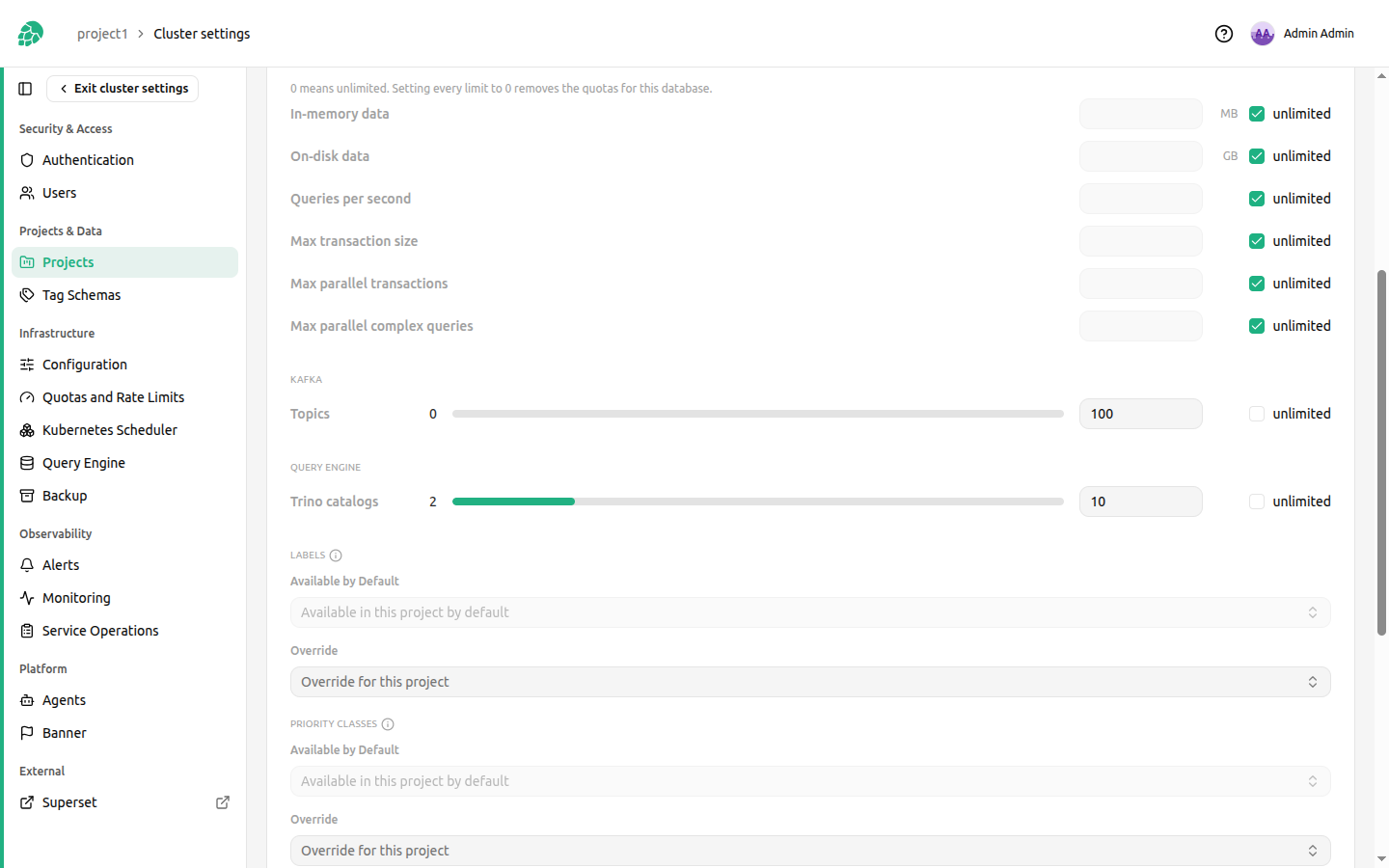
A new project starts on the cluster default (trino_catalog_max_per_project, 10), so raising one project here raises that project only. Checking unlimited removes the project's own bound, leaving only the cluster-wide ceiling; a limit of 0 blocks new catalogs in the project. Both bounds apply to a create: the project must be under its own allowance, and the cluster must be under the ceiling.
The wait for a quiet moment#
A due scheduled restart does not fire into a busy cluster immediately. It waits for the cluster to have no query running, queued, or blocked, re-checking every few minutes for up to an hour, and then restarts anyway: the wait buys a quiet moment when one exists, and the bounded give-up keeps a permanently busy cluster from deferring catalog changes forever.
An activity count the query engine cannot report counts as busy rather than idle, so a failed reading never costs someone their query. The bounded wait is what makes that safe: a coordinator that is genuinely down never reports itself idle, and the restart that recovers it still happens when the window expires.
Restarting#
Trino reads catalogs only at startup, so a catalog change takes effect on the next restart, whether the schedule performs it or an administrator does. Clicking "Restart Trino" applies the selected pending requests and rolls out the coordinator and workers. The confirmation dialog reports how many queries are currently running or queued, so you can choose a low-traffic window, and asks you to type confirm before it will proceed. The restart cancels those queries for every project on the cluster, not only the project whose catalog is being applied, and in-flight results are lost. Trino keeps recent query detail in the coordinator's memory, so after a restart the live query views show only what the new coordinator has seen; older queries remain in the query history, which is stored separately.
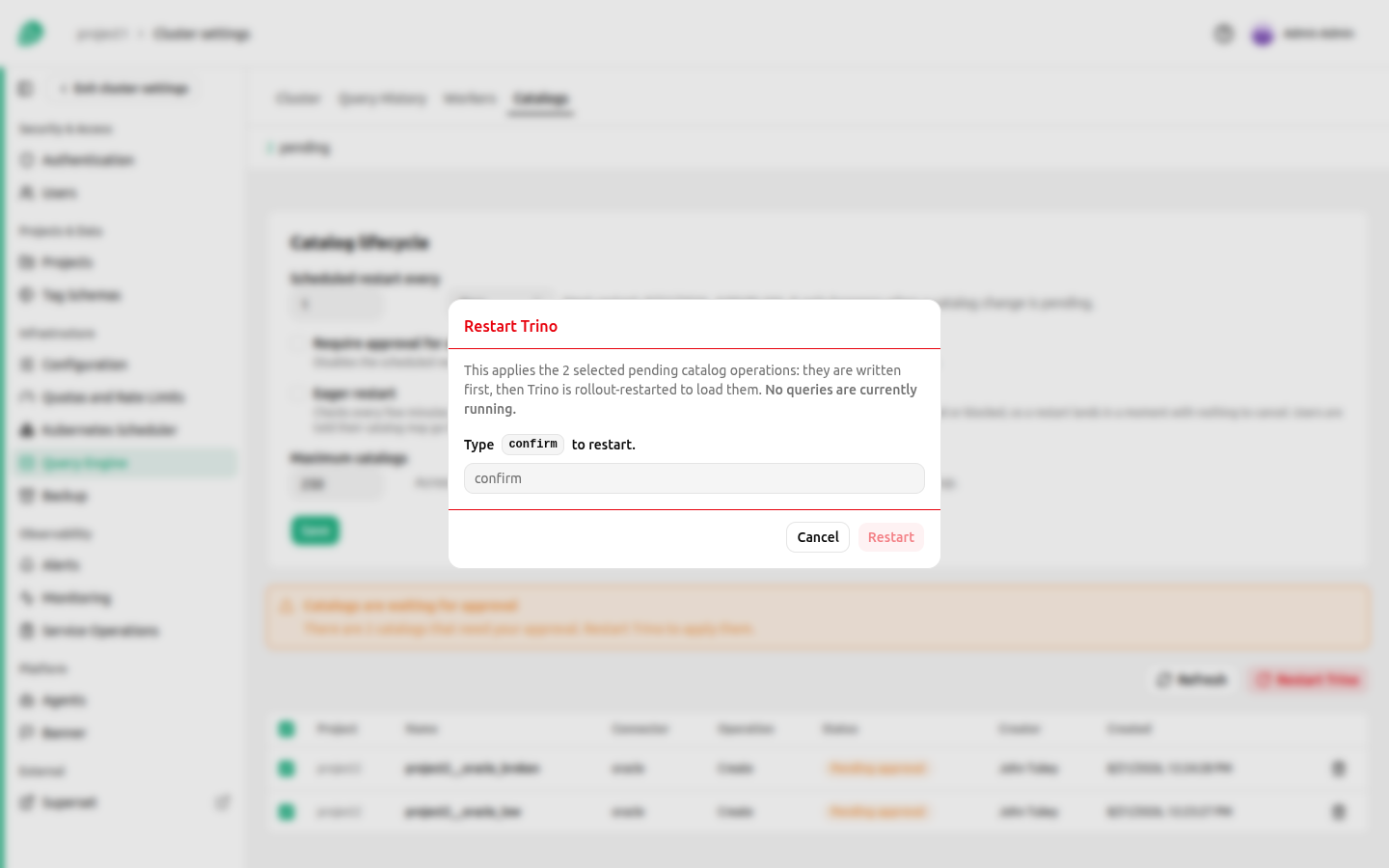
A restart is refused while another one is already running, so concurrent actions by different administrators cannot collide or trigger redundant restarts. If nothing is waiting to load or unload, the restart is skipped and reported as such rather than interrupting queries for no reason.
Recovering a catalog Trino cannot load#
Trino reads its catalogs at startup and refuses to start if it cannot load one of them. A user catalog with an invalid definition therefore stops the whole query engine, coordinator and workers alike, and the pods stay in CrashLoopBackOff. Kubernetes keeps the previous pods serving while the new ones fail, so queries may keep working for a while and the rollout never completes.
Click "Restart Trino" to recover. The button stays available when nothing is waiting to be applied, because this situation leaves no pending catalog to load: the restart itself is the repair.
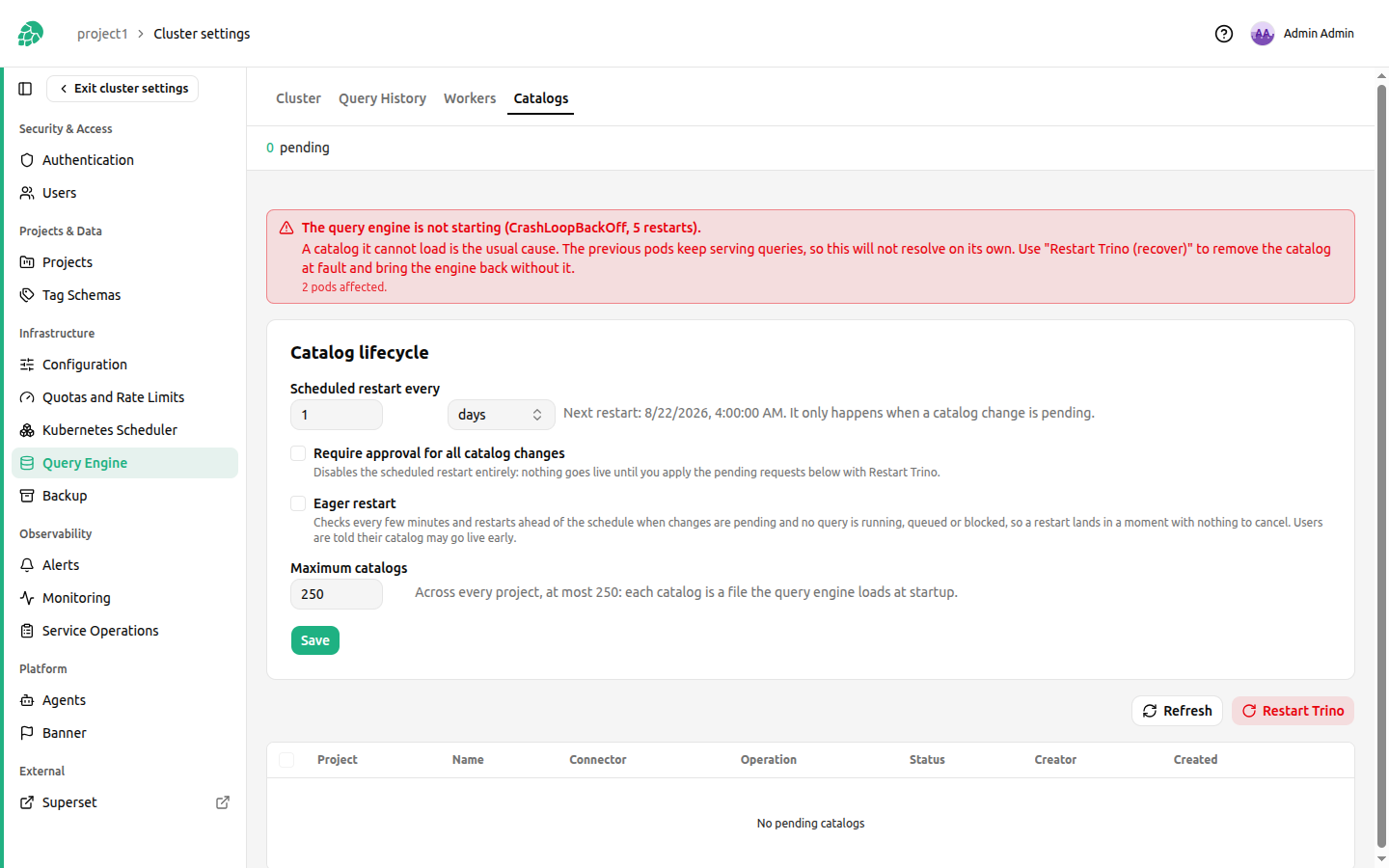
Hopsworks reads the coordinator log, identifies the catalog Trino rejected, removes it from the mount, marks it Failed, and restarts so the cluster comes back without it. The result names the catalogs that were removed:
Removed 1 catalog Trino could not load.
project1__orders_pg. Trino is restarting without them; the owners must fix the definitions.
Only user-created catalogs are removed this way. A default catalog that fails to load is left in place, because that is a cluster configuration problem rather than something an administrator should resolve by deleting data.
A removed catalog keeps its row, so its owner can see what happened on the project's Catalogs page along with the error Trino reported. Editing the definition returns it to Pending approval and it re-enters the normal flow.
Failed catalogs are not listed under pending, because they no longer block anything and no administrator action can fix them. If Hopsworks cannot attribute the failure to a user catalog, it reports the connection error instead of removing anything, and the coordinator log is the place to look.
Recovering catalog files lost from the mount#
The catalog definitions are stored in the Hopsworks database, and the Kubernetes Secrets mounted at /etc/trino/catalog are derived from it. A restore that brings back the database alone, a GitOps sync that prunes resources it does not manage, or a Secret deleted by hand therefore leaves catalogs that exist in Hopsworks with no file for Trino to read.
POST /hopsworks-api/api/admin/trino/catalogs/reconcile repairs it. It writes the missing files back from the database, removes files that no catalog belongs to, which is also how a credential stops being mounted once its catalog is gone from the database, and reports what it changed. It is always available, since an administrator calling it has already established that the repair is needed. It also compares file contents, so it corrects a file whose name is right but whose content no longer matches the database.
Set trino_catalog_reconcile_enabled to true to have the same repair run on a schedule instead, shortly after startup and on the reconcile interval thereafter. It is off by default because losing a shard Secret takes one of the events above rather than anything routine, so the repair belongs on a cluster that needs it rather than on every cluster. Each scheduled pass compares which catalog files the Secrets hold against which ones the database expects, and repairs only when they disagree. Comparing names rather than contents is what keeps a pass cheap enough for an interval, since rebuilding a file means decrypting every secret it references. The consequence is that the scheduled pass does not notice a file whose name is right and content is wrong; use the endpoint for that.
Two things neither form does. Neither restarts Trino, so a restored catalog is in the mount but not loaded until the next restart, like any other catalog change. Neither touches a catalog that is pending approval, because that catalog's stored definition is the change an administrator has not approved yet, and applying it here would bypass that decision. Those catalogs are reported as still needing approval.
A catalog whose ${HOPSWORKS_SECRET:<name>} reference no longer resolves cannot be rebuilt, since the file Trino reads has to hold the resolved value. The repair reports it, leaves any file it already has in place, because that copy resolved when it was approved and still works, and carries on with every other catalog. Its owner has to repoint the reference at an existing secret.
Access control and sharing#
The query engine decides who can read what with Trino's file-based access control, from a rules file published into the Trino files store as access-control/rules.json. Hopsworks owns that file and rebuilds it whenever a share changes, and on a schedule every five minutes by default.
The file is composed from two parts:
- The base policy, from the Helm value
trino.accessControl.rules, which the chart renders into the ConfigMaphopsworks-trino-access-control-base. It grants each project its own catalogs and feature store, and each user their private catalogs, written only from projects where the user is a Data Owner. Administrators see every catalog but read onlysystem,tpchandtpcds, because the query engine's administrator is also the identity Hopsworks itself uses, and a view recorded as owned by it would otherwise read any project's data. The administrators' SQL console therefore cannot read a project's tables; query them as a member of the project. - One set of rules per share, for catalog shares and feature group shares. A share names the receiving project's existing
<project>__data_ownerand<project>__data_scientistgroups, so sharing never changes the group file.
Change the base policy through the Helm value and an upgrade. An edit to the published rules.json is overwritten by the next rebuild, within minutes.
Every rebuilt file is validated before it is published, and a file that fails validation is not published: the shares that caused it are marked Failed with the reason, and the file in place stays as it was. After publishing, Hopsworks checks that the query engine still answers once it has re-read the file, and restores the last file that worked if it does not, because Trino refuses every query while its rules file is unreadable.
The shared feature store catalogs#
The chart ships two kinds of catalog over the feature store:
delta,hudi,icebergandhiveimpersonate the querying user, so HopsFS permissions apply on top of the access-control rules. They serve a project's own feature groups, and feature groups or feature stores shared whole, which HopsFS grants the receiving project.delta_shared,hudi_sharedandiceberg_shareddo not impersonate. They read HopsFS as thetrinouser, which is a HopsFS superuser, because a feature group shared with a subset of its features grants the receiving project no HopsFS access.
For the second kind the access-control rules are the only gate. The base policy grants nobody access to them, not even administrators, and Hopsworks adds a rule per subset share that allows the receiving project the shared features of that one table and denies the rest. They are read-only at the connector as well, so no rule can let a query write through them. Do not add rules for these catalogs to the base policy: any rule that reaches one of them reads every project's feature store. Administrators are denied them because Trino runs a view as the user recorded as its owner, so a view recorded as owned by an administrator would reach them too.
Reading the rules file#
The rules the query engine enforces can be read under Cluster Settings → Query Engine → Files, as access-control/rules.json. Beside it, access-control/rules.json.last-good is the last file the query engine loaded. They differ from a publish until Hopsworks confirms the query engine loaded the new file, a few seconds later. If they stay different, the new file is not confirmed yet, for example because the query engine was unreachable, and the next reconcile checks again. That check only happens while trino_reconcile_enabled is on. A file the query engine refused does not stay: the last good file goes back in its place, and the shares the refused file added are marked Failed. The groups the rules name are in auth/group.db.
Who the rules match#
A query runs as a principal named <project>__<username>, for example seeda__seed1000 for user seed1000 in project seeda. Its groups are the member's role in that project, <project>__data_owner or <project>__data_scientist, and <owner>__shared_featurestore for each project <owner> whose feature store is shared with that project. Group admin has one member, the query engine administrator, which is the identity Hopsworks itself uses. Project names and usernames cannot contain __, so a pattern such as .*__(.*) splits a principal unambiguously, and $1 in a later field stands for what the pattern captured.
Each section of the file (catalogs, schemas, tables, functions, queries) is checked on its own. In a section, the first rule whose user, group and object all match decides, and a request no rule matches is denied. The order of the rules is therefore the policy: a broader rule placed first would answer before a narrower one.
The order of the rules#
Every section keeps the same order, and the rules Hopsworks adds for shares go in one place in it:
- The administrator rules.
- A deny for each private catalog whose owner's account was deleted, until the catalog is removed. It comes before the private-owner rules because a later account with the same username would match them.
- The private-owner rules. They come before the shares so that sharing a private catalog with a project the owner belongs to never narrows the owner's own access.
- The share rules.
- The rest of the base policy: every project's own catalogs and feature store.
The base policy#
The catalogs section of the base policy, in order:
| Rule | Effect |
|---|---|
group: admin, allow: none on iceberg_shared, delta_shared and hudi_shared | The administrator never sees the shared feature store catalogs. |
group: admin, catalog: .*, allow: read-only | The administrator sees every other catalog, without writing to any. |
user: .*__(.*), group: .*__data_owner, catalog: _$1__.*, allow: all | The owner of a private catalog reads and writes it from a project where they are a Data Owner. |
user: .*__(.*), catalog: _$1__.*, allow: read-only | The owner reads it from any other project. |
catalog: tpch and tpcds, allow: read-only | Everyone reads the sample catalogs. |
catalog: iceberg, delta, hive, hudi, allow: all | Everyone reaches the feature store catalogs; the table rules decide what they read. |
group: (.*)__data_owner, catalog: $1__.*, allow: all | A project's Data Owners read and write its catalogs. |
group: (.*)__data_scientist, catalog: $1__.*, allow: read-only | Its Data Scientists read them. |
catalog: system, allow: read-only | Everyone reads the system catalog. |
The tables section follows the same pattern: the administrator reads only system, tpch and tpcds, the private-owner rules mirror the catalog ones, and each project reaches the schema <project>_featurestore in the feature store catalogs, all of it for its Data Owners, reading for its Data Scientists and for projects its feature store is shared with. The schemas section gives schema ownership, which is what creating and dropping schemas needs, to Data Owners only. The functions section lets everyone run builtin functions, and the Data Owners of a project run the system functions of their project's catalogs, such as system.query on a JDBC catalog.
The rules a share adds#
Hopsworks writes the names in a share rule as literals between \Q and \E, so a name containing regular expression syntax matches only itself. A share names the receiving project's two role groups in one pattern, \Q<project>\E__data_(?:owner|scientist), so searching the file for \Qseedc\E__data_ finds every rule a share to seedc added.
A share of catalog seeda__postgresql with seedc, covering table public.customers with column created unchecked and column name masked, adds these rules:
{"catalogs": [
  {"group": "\\Qseedc\\E__data_(?:owner|scientist)", "catalog": "\\Qseeda__postgresql\\E", "allow": "read-only"}
],
"tables": [
  {"group": "\\Qseedc\\E__data_(?:owner|scientist)", "catalog": "\\Qseeda__postgresql\\E",
   "schema": "\\Qpublic\\E", "table": "\\Qcustomers\\E", "privileges": ["SELECT"],
   "columns": [{"name": "created", "allow": false}, {"name": "$path", "allow": false},
               {"name": "name", "mask": "'***'"}]},
  {"group": "\\Qseedc\\E__data_(?:owner|scientist)", "catalog": "\\Qseeda__postgresql\\E",
   "schema": "\\Qpublic\\E", "table": "\\Qcustomers\\E\\$.*", "privileges": []}
],
"functions": [
  {"group": "\\Qseedc\\E__data_(?:owner|scientist)", "catalog": "\\Qseeda__postgresql\\E", "privileges": []}
]}
The list of denied columns in the rule is shortened here.
- The catalog rule makes the catalog visible to the receiving project, read-only.
- The table rule grants
SELECTon the table and lists the columns it denies: the unchecked ones, the connector's hidden columns, such as$path, and, for an Iceberg or Delta Lake table, every column the table had at a version that can still be read. A table shared whole has a table rule withoutcolumns, a schema shared whole hastable: .*, and a catalog shared whole hasschema: .*too. - The rule after it, with no privileges, denies the table's metadata tables, such as
customers$partitions, which Trino checks by their own name. - The function rule denies the receiving project the catalog's functions, which the base policy would otherwise give it. A share of a private catalog also adds, before that deny, a rule letting the owner keep running the catalog's
systemfunctions.
A feature group shared whole adds one table rule on hive|iceberg|delta|hudi for its table in the owner's feature store. A feature group shared with a subset of its features adds a catalog rule on the shared catalog of its format, such as delta_shared, and a table rule there that denies every unshared feature and hidden column, followed by the metadata table deny.
Debugging a share#
- The share is Active but a query is refused: find the share's rules by the receiving project's group, then look for a rule above them that matches the same principal and object first.
- The share's rules are not in the file: the share is still Applying, or it is Failed and its status says why.
- A column that should be hidden is readable: it is missing from the rule's
columns. Each publish denies every column the table has at that moment except the shared ones, so a column added at the source is readable only until the next publish, at most one reconcile interval. - A narrowed table is refused although its share is Active: the last publish could not read the table's columns, or for an Iceberg or Delta Lake table the columns of its earlier versions, so it left the table out of the rules rather than grant it with columns it could not deny; the Hopsworks log names the table. An Iceberg table whose metadata file is outside HopsFS, over 64 MiB or unreadable by that project user is also left out until its earlier columns are read, 50 snapshots per publish.
rules.jsonandrules.json.last-gooddiffer for minutes: the newest file is not confirmed, so check that the query engine is reachable; the reconcile verifies it again and restores the last good file if the query engine refuses it.
Credential files a project supplies#
A connector that authenticates with a file, such as an Oracle wallet or a Java keystore, cannot be served by a catalog property alone. Projects supply those files as mountable secrets, and this section covers what that adds to a cluster.
A bundle is a directory of files in HopsFS under mountable_secrets_path, which defaults to /apps/mountable-secrets. It is keyed by project id rather than by project name, so a deleted project and a later project of the same name can never share a directory. The charts/hopsfs preset Job creates the root as payara:hdfs with mode 0750. The backend checks that owner, group and mode against the filesystem on a project's first bundle, and again before it deletes a project's tree, and refuses if any of the three differs, so a root created by hand with the wrong mode is rejected rather than quietly widening access.
Project members never reach those files directly. The path is outside any project's dataset, and a catalog can only ever name a bundle in its own project. A reference resolves to a path built from the project id, and a property that tries to extend a reference with a path, or to walk out of it with .., is refused when the catalog is created and again when it is resolved.
How the files reach the query engine#
Each Trino pod, the coordinator, every worker and the test coordinator, runs a sidecar container named mountable-secrets from the hopsfs-mount image. It mounts the whole store read-only at trino_mountable_secrets_root, which defaults to /opt/hopsworks/mounts, with ro, nosuid and nodev. Entries appear as uid 0 with modes that let any user read them, which is what lets the unprivileged Trino process open a wallet.
Two consequences of that sidecar are worth knowing before an upgrade.
It is privileged, because FUSE requires it. On a cluster running the Kyverno restricted policies the chart ships a PolicyException for these pods, gated on Kyverno being enabled. The same privileged FUSE sidecar already runs on the three Airflow deployments in the release namespace, so this is not a new class of workload for the cluster.
The Trino pods have their own ServiceAccounts, hopsworks-trino and hopsworks-trino-test, rather than the namespace default. An SCC or a cloud identity can therefore be granted to Trino narrowly. An upgrade from a release before this feature moves those pods off the default ServiceAccount, so any binding that named default to reach Trino has to be repointed.
OpenShift is not supported
The sidecar has to run privileged and as root, so the default restricted SCC rejects it. values.openshift.yaml therefore turns the store off, and a project on such a cluster cannot supply credential files. Note that Trino was already rejected by the restricted SCC before this feature, because the subchart pins runAsUser: 1000 regardless of securityContextEnabled, so the sidecar adds a second reason rather than a new break.
Turning the store off#
Set global._hopsworks.trino.mountableSecrets.enabled to false, which seeds the mountable_secrets_enabled variable and stops the store being offered. Turning it off is not a single value. The sidecar entries live in untemplated subchart values, so the initContainers lists have to be restated without them, which is what values.openshift.yaml does and is the worked example to copy. The chart fails the render when the flag and the mount disagree, so a half-done change stops the upgrade instead of producing pods that mount nothing.
An already approved catalog keeps working only as far as its definition. Its reference still resolves to a path, but nothing populates that path any more. For a connector that opens its files when a connection is made, such as Oracle, the coordinator starts cleanly and queries fail. Writing a catalog out does not consult the flag, by design, so switching the store off does not quarantine catalogs that already use it.
Backup#
Bundles are HopsFS files. They are covered by the HopsFS backup, and not by the Kubernetes object backup that captures the catalog Secrets and the database. A restore that brings back the database and the Secrets without the HopsFS path leaves catalogs that reference bundles which no longer exist, and those catalogs fail to authenticate at the next restart. Recreating the bundle under the same name with the same filenames repairs it without editing any catalog.
Diagnosing a bundle#
There is no admin API for the store, so the checks are on the cluster.
# What the query engine can actually see for project <id>
kubectl exec -n hopsworks <trino-pod> -c <trino-container> -- ls -l /opt/hopsworks/mounts/<id>/<bundle>

# The mount itself, including its options
kubectl exec -n hopsworks <trino-pod> -c <trino-container> -- grep /opt/hopsworks/mounts /proc/mounts

# The source side
kubectl exec -n hopsworks <namenode-pod> -- /srv/hops/hadoop/bin/hdfs dfs -ls /apps/mountable-secrets/<id>
Check the mount on a worker and not only on the coordinator, since a query reads the source from the workers. A missing mount is otherwise invisible: the sidecar mounts into its own filesystem, both containers report ready, and only a ${HOPSWORKS_MOUNT:...} reference resolving to an empty directory gives it away.
The outbound addresses a data source must admit are reported in the project's Catalogs tab only when global._hopsworks.trino.mountableSecrets.egressProbe.echoUrl is set. It is empty by default, because the probe otherwise calls a third-party service from every Trino pod on every start, and with it unset the UI reports that the addresses could not be determined. Without it:
Configuration#
Trino behavior can be customized through cluster configuration variables. To modify these settings, navigate to Cluster Settings → Configuration and search for the variable name.
Available Variables:
- trino_enabled: Enable or disable Trino cluster-wide (default:
false) - trino_default_catalog: Default catalog of the Superset database connections created for new project members (default:
delta). Connections created before a change keep the catalog they were created with. - trino_test_coordinator_enabled: Enable the optional test coordinator that backs the "Test connection" action for user-created catalogs (default:
true) - trino_reconcile_enabled: Rebuild the login and group files from the database and republish the access-control rules on the reconcile interval (default:
true). Do not disable it. It is what confirms a published rules file once the query engine was unreachable when Hopsworks first checked: without it, shares stay Applying or Revoking and the new file never becomes the last good one, until another share change publishes again. It is also what brings a changed base policy from a chart upgrade to the query engine, and what replaces a rules, login or group file that was edited, corrupted or deleted. - trino_reconcile_interval_ms: How often the reconcile runs, in milliseconds (default:
300000) - trino_catalog_reconcile_enabled: Rebuild the user-catalog Secrets from the database on a schedule, for a cluster that has lost them (default:
false, see Recovering catalog files lost from the mount) - trino_catalog_max_per_project: Catalogs a newly created project may create (default:
10). It seeds each project's own allowance, which is then edited per project under Cluster Settings, Projects; changing it does not move the allowance of a project that already exists. - trino_catalog_max_bytes: Largest a single catalog definition may be once its secret references are resolved, in bytes (default:
16384) - trino_max_catalogs: Catalogs the whole cluster may have, across every project (default:
250, which is also the ceiling). Each catalog is a file the query engine loads at startup, so the setting may lower the bound but never raise it. - trino_scheduled_restart_enabled: Apply pending catalog changes with a scheduled restart (default:
true). Safe to leave on, because the restart is skipped entirely when no catalog change is pending. - trino_scheduled_restart_interval_hours: How often the scheduled restart fires (default:
24). Edited from the Catalog lifecycle card as "every N hours/days". - trino_scheduled_restart_time: Anchor time of day for the cadence,
HH:mmin the server's timezone (default:02:00). Off-peak by default because the restart cancels every running query. - trino_scheduled_restart_idle_wait_minutes: How long a due scheduled restart waits for the cluster to go quiet before restarting anyway (default:
60). Bounded, because a permanently busy cluster must not defer catalog changes forever. - trino_scheduled_restart_idle_retry_minutes: How long to wait between those quiet-moment re-checks (default:
5). - trino_eager_restart: Restart ahead of the schedule the moment the query engine is idle while changes are pending (default:
false). - trino_eager_restart_poll_minutes: How often the eager restart looks for that idle moment (default:
10). - trino_catalog_approval_required: Require an administrator to apply every catalog change (default:
false). Turning it on cancels the scheduled restart timers entirely, because approval means nothing goes live unattended.
These settings control the availability and default behavior of the Trino query engine across your Hopsworks cluster.
Mountable secret settings#
These are not all editable the same way, so they are listed apart from the variables above.
Three are seeded by the chart and belong to Helm, not to the variables table.
| Setting | Helm value | Seeded default |
|---|---|---|
mountable_secrets_enabled | global._hopsworks.trino.mountableSecrets.enabled | true |
mountable_secrets_path | global._hopsworks.trino.mountableSecrets.storeRoot | /apps/mountable-secrets |
trino_mountable_secrets_root | global._hopsworks.trino.mountableSecrets.mountPath | /opt/hopsworks/mounts |
Change these through your Helm values and an upgrade. Editing the row instead moves only one end of the arrangement: the store root also presets the HopsFS directory and is passed to the mount sidecar as its source, and the mount root is what the Trino containers actually mount, so a row edited on its own points the backend at a path nothing is mounted from. The chart keeps the two ends together, and refuses to render when the flag and the mount disagree. Note also that the code's own fallback for the flag is false, which is what a cluster whose chart predates the row gets; the chart seeds true.
The five per-project limits have no seeded row at all. The code's defaults apply until an administrator creates one, so searching for them in Cluster Settings finds nothing on a fresh cluster, which is expected rather than a fault.
| Setting | Default | What it caps |
|---|---|---|
mountable_secret_max_per_project | 10 | bundles one project may hold |
mountable_secret_max_files | 32 | files in one bundle |
mountable_secret_max_file_bytes | 1048576 | largest single file, in bytes |
mountable_secret_max_project_bytes | 16777216 | a project's total across all its bundles, in bytes |
max_mountable_secret_upload_bytes | 33554432 | largest upload request, refused before the body is read |
Turning the store off is described in Turning the store off.
How sharing scales#
Every change to a share, and every reconcile, publishes the whole rules file again. A publish reads the current columns of each table a share narrows to some of its columns, one statement per table, so its duration grows with the number of distinct narrowed tables across all shares. A narrowed Iceberg or Delta Lake table also has the columns of its earlier versions read:
- An Iceberg table on HopsFS: one more statement, and a read of its current metadata file, which lists every schema the table has had. Hopsworks reads the file as the project user the table's columns are read as, only up to 64 MiB, and uses it only when it names the snapshot Trino reports for it.
- Any other Iceberg table: two more statements, and one per snapshot not read before: one per schema the table has had, and every snapshot older than its metadata log, which keeps the last 100 entries by default. At most 50 snapshots are read per publish; a table with more is left out until later publishes have read them all. A table with more than 10,000 such snapshots cannot be listed and is left out; expiring old snapshots, or keeping the table on HopsFS, avoids it.
- A Delta Lake table: one statement that reads the commits since the last publish, or every commit still in the table's log the first time, and on that first read one more for the oldest of them. The statement reads back from the newest commit to the first missing one, so versions before a gap in the log are not read; only log files removed by hand leave such a gap.
Each Hopsworks instance keeps what it has read in memory, so after a restart its first publish reads each table's history in full once. It reads it again at least once a day: a Delta Lake table in full on that publish, an Iceberg table's snapshots 50 per publish while the earlier reads still count, so the table is never left out for it. A publish forgets the tables no share narrows any more. Measured on a development cluster, as extra time per narrowed table on top of reading its current columns:
| Table | 1 commit | 100 commits | 300 commits |
|---|---|---|---|
| Delta Lake feature group, first read | 0.1 s | 1.9 s | 6.6 s |
| Delta Lake feature group, later publishes | not measured | not measured | none measurable |
| Iceberg table on HopsFS (metadata file size) | 0.1 s (4 KB) | 0.1 s (203 KB) | 0.3 s (556 KB) |
| Iceberg table read through its snapshots, snapshots to read | 1 | 3 | 201 |
A later publish of the 300-commit table, reading from the 290th or 299th commit, took as long as SELECT 1. Reading the current columns of the Delta Lake table also grew, from 0.5 s at 100 commits to 2.7 s at 300.
Saving, editing or revoking a share returns once the share is recorded; the share shows Applying or Revoking until the publish has run and the query engine has loaded the file, about 15 seconds after the publish ends. Changes made while a publish runs are applied together by the next one.
Measured on a development cluster with a PostgreSQL source, which has no earlier versions to read: four shares, each of a project catalog or a private catalog with one of two projects, each narrowed to N tables with two of their six columns shared.
| Tables per share | Narrowed tables in the rules | Publish duration | rules.json size | Table rules | Median query time |
|---|---|---|---|---|---|
| 0 (one schema shared whole) | 0 | 5.6 s | 25 KB | 35 | 0.9 s |
| 25 | 100 | 10.9 s | 204 KB | 231 | 0.9 s |
| 100 | 400 | 21 s | 744 KB | 831 | 0.9 s |
| 300 | 1,200 | not measured | 2.19 MB | 2,431 | 0.9 s |
The query time is through the Hopsworks API, for a receiving project, the catalog's owner and SELECT 1 alike, and did not change with the size of the file. The publish duration at 300 tables per share was not measured on its own. With the four shares saved one after another, a save took 5 to 7 seconds at 100 tables per share and 16 to 17 seconds at 300, mostly checking the tables and columns the share names, and all four shares were Active 41 and 119 seconds after the last save. A publish costs about 75 ms per distinct narrowed table on top of a fixed 5 seconds. The file grows by about 1.8 KB per narrowed table, mostly the hidden columns each narrowed rule denies.
With the file above about a megabyte, a query once failed with Invalid JSON file '/opt/hopsworks/trino/access-control/rules.json' caused by java.io.IOException: Input/output error. The query engine reads the file through the HopsFS mount, and the read failed while a new file was replacing it; the file itself was complete. The query succeeds when run again. Hopsworks does not take such a read failure for a broken file, so it neither restores the last good file nor fails the shares being applied.
Test coordinator resource cost#
trino_test_coordinator_enabled is on by default, and enabling it runs an additional single-node Trino coordinator pod for the lifetime of the cluster. It exists only to connection-test user catalogs before they are approved, so on a small or cost-sensitive cluster it is reasonable to turn it off. When it is off, "Test connection" reports that testing is unavailable and every other part of the catalog workflow is unaffected.
Supported connectors#
A project can create a catalog on any connector installed in the Trino image. Connectors that expose no external data source are rejected: system and jmx (which would expose the query engine's own internals, including other projects' query text), memory and blackhole (which hold no data), datasketches and ai (function plugins), and tpch and tpcds, which already ship as shared read-only catalogs.
The installed set is the cluster variable trino_connectors, whose default matches the Trino image the chart pins. The backend refuses a catalog on anything outside it, so a connector name that is not installed is rejected when the catalog is created rather than stopping the coordinator at the next restart. The connector picker in the project UI is served from the same list, so it offers exactly what the backend accepts.
Change trino_connectors only when running an image with a different plugin set. Removing a connector from the list does not affect catalogs already created on it.
Catalog storage capacity#
User-created catalogs are stored across a fixed number of Kubernetes Secrets, set by the Helm value global._hopsworks.trino.userCatalogShards (default: 2). Each Secret holds up to roughly 800 KiB of catalog definitions, so the default gives about 1.6 MiB in total, which is a large number of catalogs. When they are full, an approval fails with an error naming the limit.
Raise the value in your Helm values to add capacity. The chart mounts one source per shard and refuses to render if the two disagree, so a mismatch fails the upgrade rather than silently dropping catalogs.
Two per-catalog limits keep one project from consuming that shared budget. trino_catalog_max_per_project caps how many catalogs a project may create, and trino_catalog_max_bytes caps how large a single definition may be. The size is measured after ${HOPSWORKS_SECRET:} references are resolved, because the resolved form is what occupies a Secret: a stored definition is bounded by its database column, but a reference costs a couple of dozen characters and expands to a secret of up to about 10 KiB, and the same secret may be referenced repeatedly, so a row that fits its column can resolve to megabytes. The check therefore runs both when a catalog is created, so its owner hears about it, and again at approval, because a secret can be rotated to a larger value in between.
Both defaults are generous against real catalogs, which are a few hundred bytes; the largest legitimate ones inline a service account JSON or a certificate pair and stay a few KiB. Raise them for a project with an unusual number of external sources, and remember that the product of the two bounds a single project's share of the shard budget.
Best Practices for Trino Management#
- Monitor regularly: Check cluster overview daily to spot trends and issues early
- Review slow queries: Investigate queries with long execution times in the query history
- Balance workload: Ensure workers are evenly distributed and not overloaded
- Scale appropriately: Add workers during peak usage periods if resources are constrained
- Track growth: Monitor query volume trends to plan for future capacity needs