External Kafka cluster#
Hopsworks uses Apache Kafka to ingest data to the feature store. Streaming applications and external clients send data to the Kafka cluster for ingestion to the online and offline feature store. By default, Hopsworks comes with an embedded Kafka cluster managed by Hopsworks itself, however, users can configure Hopsworks to leverage an existing external cluster. This guide will cover how to configure an Hopsworks cluster to leverage an external Kafka cluster.
Broker version requirement
Hopsworks 5.2 connects to Kafka with kafka-clients 4.3.1, which only speaks to brokers running Kafka 2.1 or newer (KIP-896). An external cluster on an older broker version stops working after the upgrade to 5.2, so upgrade the brokers first. See the Kafka 4 and KRaft upgrade notes.
Configure the external Kafka cluster integration#
To enable the integration with an external Kafka cluster, set the enable_bring_your_own_kafka configuration option to true. In the Helm values used to deploy Hopsworks:
Online Feature Store service configuration#
The Online Feature Store service (OnlineFS in short) consumes the feature store topics and writes them to the online feature store, so it needs to connect to the external Kafka cluster too. Point it at the brokers and give it the credentials it needs:
onlinefs:
  dependencies:
    kafka:
      url: "cluster_identifier.us-east-2.aws.confluent.cloud:9092"
      securityProtocol: SASL_SSL
  configmapOverrides:
    kafka:
      sasl.jaas.config: 'org.apache.kafka.common.security.plain.PlainLoginModule required username="username" password="password";'
      sasl.mechanism: PLAIN
    kafkaVectorDb:
      sasl.jaas.config: 'org.apache.kafka.common.security.plain.PlainLoginModule required username="username" password="password";'
      sasl.mechanism: PLAIN
    producer:
      sasl.jaas.config: 'org.apache.kafka.common.security.plain.PlainLoginModule required username="username" password="password";'
      sasl.mechanism: PLAIN
OnlineFS opens three Kafka clients on these brokers, and each section of configmapOverrides adds or overrides the properties of one of them, so any client configuration the external cluster needs goes into all three:
kafka: the consumer that writes the feature group rows to RonDB.kafkaVectorDb: the consumer that writes embeddings to the vector database.producer: the producer of the notifications of feature groups that have a notification topic.
With a securityProtocol other than PLAINTEXT, the chart also points the three clients at the truststore and keystore of the Hopsworks certificates. The values are stored in the OnlineFS ConfigMap, so the password in sasl.jaas.config is readable there in plain text.
The OnlineFS principal needs Describe and Read on the topics it consumes, Describe and Read on the consumer groups onlinefs_rondb and onlinefs_vectordb, and Write on the notification topics.
OnlineFS subscribes to the topics matching onlinefs.configmapOverrides.onlinefssite.kafkaConsumer.topicPattern, by default .*_onlinefs. A non-empty topicList in the same section replaces the pattern and does not include the topics Hopsworks creates later, so their data would never reach the online feature store. A cluster set up with a topic list sets topicList to an empty string, and widens topicPattern until it also matches the project topics it consumes that do not end in _onlinefs:
onlinefs:
  configmapOverrides:
    onlinefssite:
      kafkaConsumer:
        topicList: ""
        topicPattern: ".*_onlinefs|my_project_topic"
Topics on the external Kafka cluster#
Hopsworks creates and deletes the topics the feature store needs on the external cluster, as it does on its embedded cluster. It connects with the kafka_connector data source of each project (see Data Source configuration). The Hopsworks pods call the brokers of that data source for every topic they create or look up, so the brokers must be reachable from the Hopsworks pods with its settings.
- Creating an online or stream feature group, changing a feature group's topic or notification topic, setting the project topic, or creating a topic through the Kafka topic API creates the topic when it does not exist yet.
- A stream feature group that is not online-enabled writes to a topic named after the project, with no suffix, unless the project or the feature group names a topic, so take that name into account when granting permissions by topic prefix.
- A topic that already exists is used as it is, and Hopsworks never deletes it.
- A topic Hopsworks created is deleted with its feature group or project, or when its feature group moves to another topic or notification topic, unless another project used the same topic name when it was created, in which case it is left in place. A feature group's topic also stays while another feature group still writes to it or sends its notifications to it.
- A topic Hopsworks created belongs to its project, so other projects cannot use it as their online or notification topic, because deleting that project would delete it. Topics Hopsworks did not create can be shared between projects.
- Topics and schemas are changed only through a project's own feature store: through a feature store shared from another project, the change is refused, because it would be made in that project and on its cluster.
- A project without a
kafka_connectordata source has its topics created on the embedded cluster, and Hopsworks deletes them there later, also after the data source is added. Create the data source before the project's first feature group so that its topics are created on the external cluster.
Topics are deleted by name
When Hopsworks deletes a topic it created on an external cluster, it deletes it on the cluster the project's kafka_connector points at then, which may differ from the cluster it was created on. Pointing a kafka_connector at another cluster while the project still has topics Hopsworks created there makes Hopsworks delete the topics of the same names on the new cluster, so delete those topics, or the project, first.
The principal of the kafka_connector data source needs the following permissions on the topics of its project:
| Permission | Needed for |
|---|---|
| Describe | Checking whether a topic exists. Producing to a topic needs it too. |
| Write | Producing to the topics. The feature store clients take their producer configuration from this data source, so without it inserts fail with an authorization error. |
| Read | Reading the topics. The offline materialization job reads the ingested rows from the topics with this data source. |
Read on the consumer groups starting with spark-kafka-relation- | The offline materialization job reads the topics with Spark, which joins consumer groups of that prefix. |
| Create | Creating topics that do not exist yet. Without it, the operations that create a topic fail with the broker's reason. |
| Delete | Deleting the topics Hopsworks created. Without it, a topic stays on the cluster and in the project's topic list. |
Hopsworks records the topics it creates by name only, so the name of a topic it creates must be unique across the Hopsworks cluster, even when projects connect to different external clusters.
The project topic and the online and stream feature group topics get onlinefs_service_thread_number partitions, by default 10, and kafka_num_replicas replicas, by default 1. Topics created through the Kafka topic API get the partitions and replicas they ask for. Where min.insync.replicas is above a topic's replicas, producers that write with acks=all fail with NotEnoughReplicas, so set kafka_num_replicas to the replication factor of the external cluster:
The variable applies to every project, also to a project without a kafka_connector data source, whose topics are created on the embedded cluster, which refuses more replicas than it has brokers.
No inference logging to an external Kafka
The inference logger of model deployments can only reach the embedded Kafka cluster. With an external Kafka cluster, a deployment created with inference logging gets no topic, and selecting an existing topic for it is refused.
Project configuration#
Topic configuration#
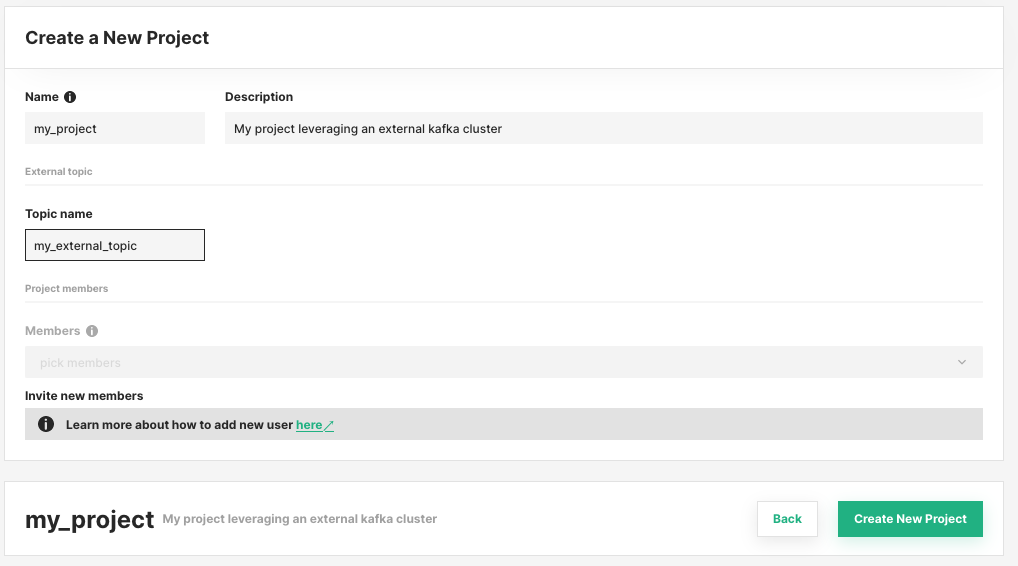
When creating a project, users can provide the topic name to use for the feature store operations. Hopsworks creates the topic on the external cluster with the first feature group that writes to it, or when the topic is changed later, if it does not exist yet. The topic can be changed later from Project Settings → Kafka, and individual feature groups can override it, as described in the ingestion topic guide.
Data Source configuration#
Users should create a Kafka Data Source named kafka_connector. Hopsworks uses it to create and delete the project's topics, and the feature store clients use it to configure the Kafka producers that send data. The configuration is done for each project to ensure its members have the necessary authentication/authorization. If the data source is not found in the project, default values referring to Hopsworks managed Kafka will be used.
Producers and consumers of your own get the same configuration from the data source, as described in the Data Source usage guide.