How To Allocate Resources To A Model Deployment#
Introduction#
Resource allocation can be configured per component (predictor and transformer) in a deployment, allowing you to specify how many CPUs, GPUs, and memory are allocated. For each component, you can set minimum (requests) and maximum (limits) resources, as well as the number of instances.
Resource defaults
| Field | Default Request | Default Limit | Validation |
|---|---|---|---|
| CPU (cores) | 0.2 | -1 (unlimited) | Request cannot exceed limit (unless -1, unlimited) |
| Memory (MB) | 32 | -1 (unlimited) | Request cannot exceed limit (unless -1, unlimited) |
| GPUs | 0 | 0 | Request must equal limit |
| Shared Memory (MB) | 128 | n/a | n/a |
Automatic downscale of inactive instances
Setting the number of instances to 0 for a component enables scale-to-zero: its instances scale down to zero after a period without requests and the next request wakes it. In Knative mode this applies to the predictor and the transformer, once the stable window (60 seconds by default) has seen no traffic. In Standard mode it applies to the predictor of a deployment without a transformer, on a cluster with KEDA, after the idle cooldown (5 minutes by default), see Scale to zero when idle.
Web UI#
Step 1: Create new deployment#
If you have at least one model already trained and saved in the Model Registry, navigate to the deployments page by clicking on the Deployments tab on the navigation menu on the left.
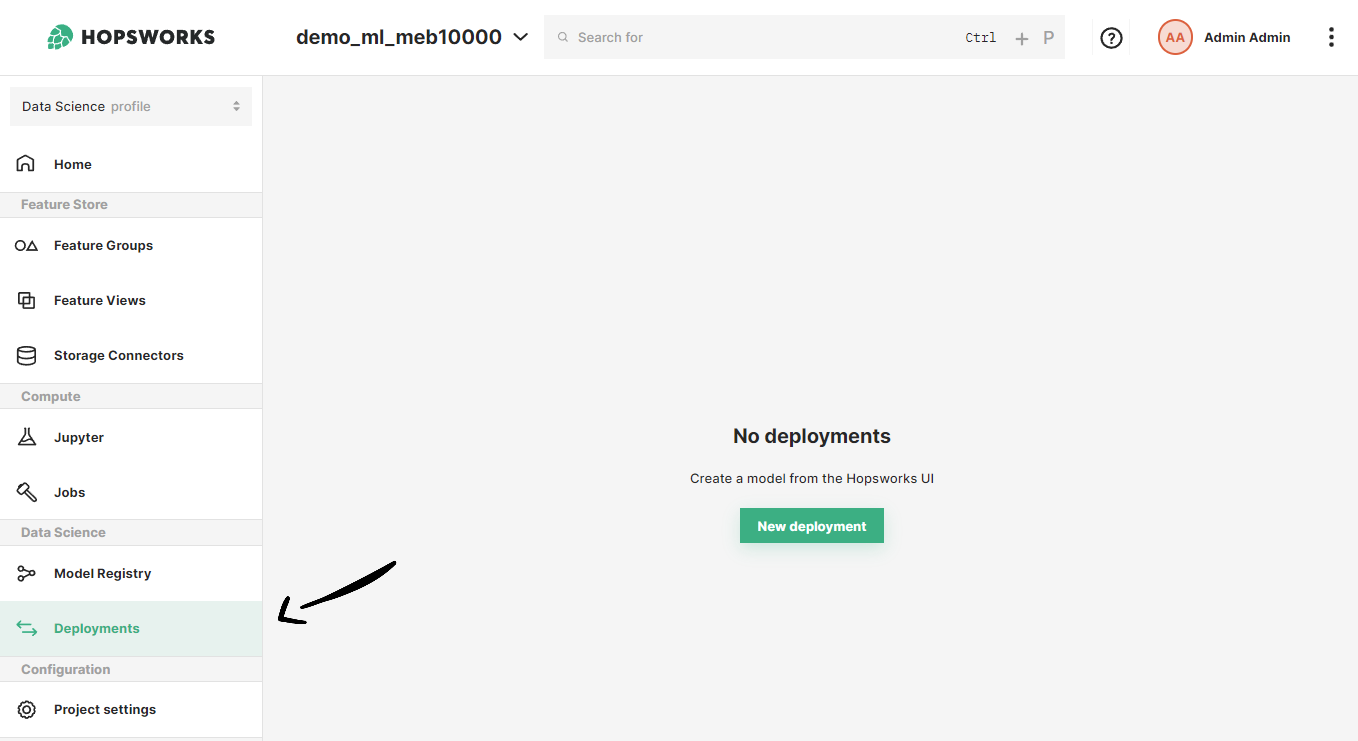
Once in the deployments page, you can create a new deployment by either clicking on New deployment (if there are no existing deployments) or on Create new deployment it the top-right corner. Both options will open the deployment creation form.
Step 2: Go to advanced options#
A simplified creation form will appear including the most common deployment fields from all available configurations. Resource allocation is part of the advanced options of a deployment. To navigate to the advanced creation form, click on Advanced options.
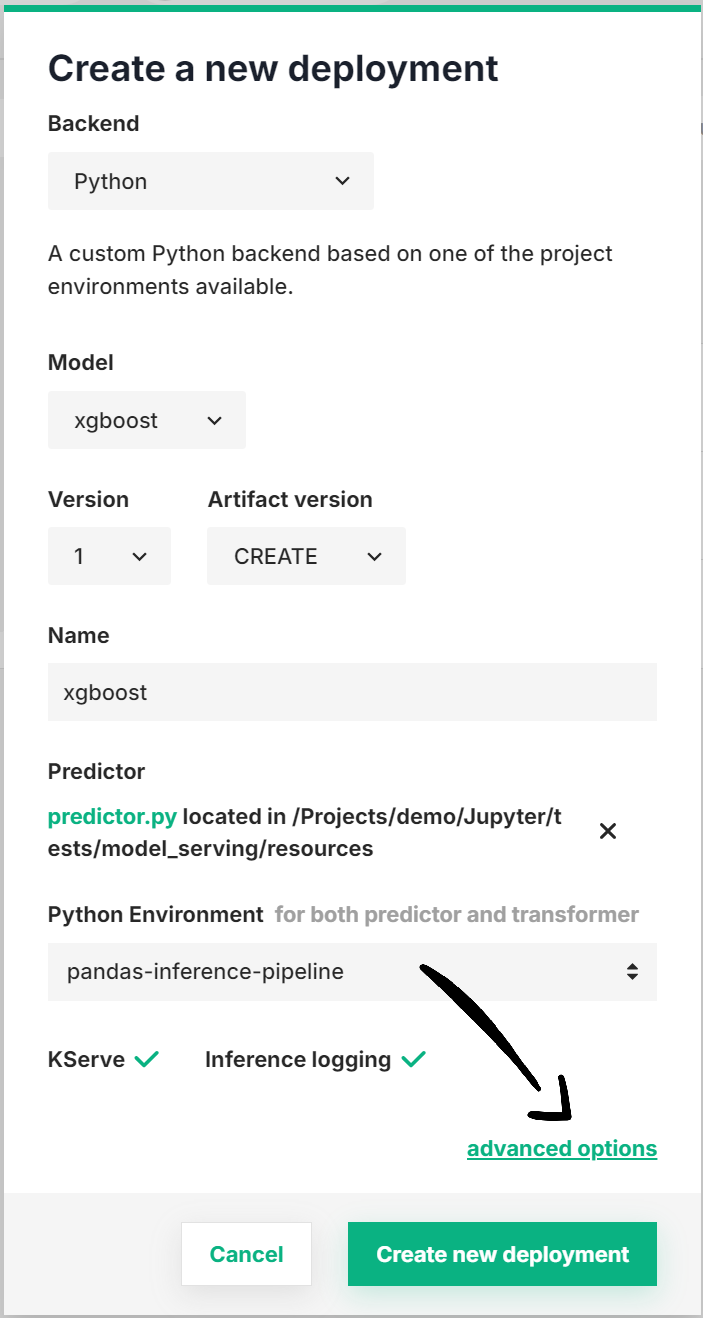
Step 3: Configure resources#
In the Resource allocation section of the form, you can optionally set the resources to be allocated to the predictor and/or the transformer (if available). Moreover, you can choose the minimum number of replicas for each of these components.
Scale-to-zero capabilities
Set the number of instances to 0 to enable scale-to-zero on the component. In Standard mode the field accepts 0 for the predictor of a deployment without a transformer on a cluster with KEDA, see Scale to zero when idle.
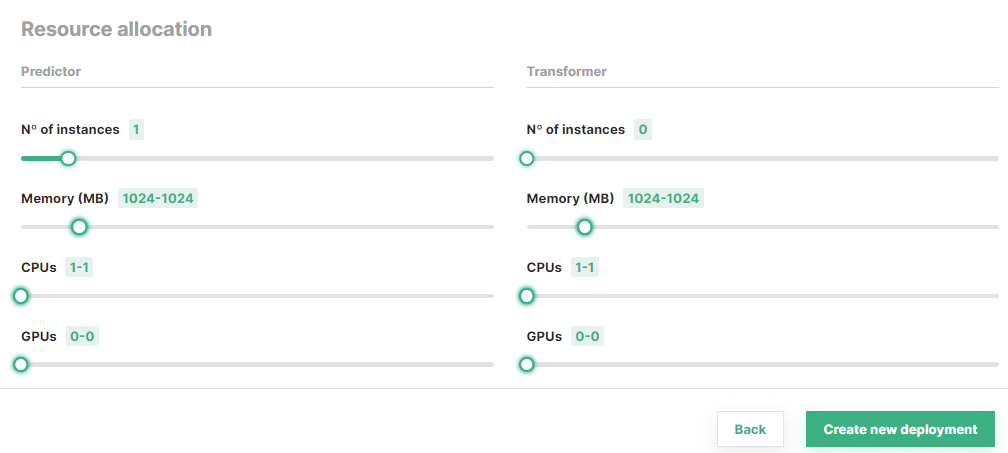
Once you are done with the changes, click on Create new deployment at the bottom of the page to create the deployment for your model.
Code#
Step 1: Connect to Hopsworks#
import hopsworks


project = hopsworks.login()

# get Hopsworks Model Registry handle
mr = project.get_model_registry()

# get Hopsworks Model Serving handle
ms = project.get_model_serving()
Step 2: Define the predictor resource configuration#
from hsml.resources import PredictorResources, Resources


minimum_res = Resources(cores=1, memory=128, gpus=1)
maximum_res = Resources(cores=2, memory=256, gpus=1)

predictor_res = PredictorResources(
    num_instances=1, requests=minimum_res, limits=maximum_res
)
Step 3 (Optional): Define the transformer resource configuration#
from hsml.resources import TransformerResources

minimum_res = Resources(cores=1, memory=128, gpus=1)
maximum_res = Resources(cores=2, memory=256, gpus=1)

transformer_res = TransformerResources(
    num_instances=2, requests=minimum_res, limits=maximum_res
)
Step 4: Create a deployment with the resource configuration#
my_model = mr.get_model("my_model", version=1)

my_predictor = ms.create_predictor(
    my_model,
    resources=predictor_res,
    # transformer=Transformer(script_file,
    #                         resources=transformer_res)
)
my_predictor.deploy()

# or

my_deployment = ms.create_deployment(my_predictor)
my_deployment.save()
API reference
Autoscaling#
Deployments can be configured to automatically scale the number of replicas: on request traffic in Knative mode, and on CPU or memory utilization, the request metrics or the vLLM engine metrics in Standard mode. To learn about the different autoscaling parameters, see the Autoscaling Guide.