Batch Feature Pipelines#
A batch feature pipeline is a job that processes a time slice of data, for example "the rows for the previous hour" or "every day's transactions", and writes the resulting features to a feature group. Hopsworks jobs carry this time slice as environment variables so your code does not need to guess the window from wall-clock time.
Two operating modes cover the common cases:
- Incremental: the pipeline runs on a recurring schedule. Each run sees a fresh
[HOPS_START_TIME, HOPS_END_TIME)computed as offsets from the cron fire time. Use this for production pipelines. - Backfill: a one-shot run over an explicit absolute time window. Use this to populate history or re-process a specific interval after a bug fix.
Both modes emit the same HOPS_* environment variables, so the same pipeline code handles both.
Environment variables#
On every scheduled or backfill execution, Hopsworks injects:
| Variable | Meaning |
|---|---|
HOPS_START_TIME | start_time_offset_seconds = null (default) → previous cron fire (last execution time). Positive integer → previous fire − seconds (shifts the start earlier). Must be ≥ 0. |
HOPS_END_TIME | Always HOPS_START_TIME + cron interval so consecutive runs tile the timeline with no gaps. end_time_offset_seconds is kept on the DTO for backward compatibility but ignored. |
HOPS_LOGICAL_DATE | Stable identifier for this interval (Airflow-style start of interval = previous cron fire). Used for dedup and retries. |
For a manual (non-scheduled) run, these variables are only set if you explicitly pass a time window via the UI or API (see Backfill below).
User-defined env vars override the scheduler
If you set HOPS_START_TIME or HOPS_END_TIME in the job's envVars (or at launch time), your value wins over the scheduler-computed one for that execution. This is how backfill runs override the cron-derived interval.
Account-level variables also apply
Variables defined under Account settings → Environment variables are also injected into every execution. A value set on the job overrides the account-level value with the same name for this job only.
Incremental (recurring)#
Create or edit a job and configure its schedule under Advanced scheduling. Typical settings for a batch feature pipeline:
cron_expression: how often to run (e.g.0 0 * ? * * *for hourly).start_time_offset_seconds: defaultnullgives the natural cron interval ([previous fire, current fire)). Set a positive integer to anchor the window earlier than the previous fire (e.g.3600makes each run see the window starting an hour before its predecessor); the window remains exactly one cron interval wide becauseHOPS_END_TIME = HOPS_START_TIME + cron interval.catchup: on by default off. Enable it if missed runs during an outage should be replayed one-per-missed-interval.max_active_runs: raise above 1 if runs can safely execute in parallel.
See How to schedule a job for the full field reference.
Reading the interval in your code#
import os
from datetime import datetime

import hopsworks


project = hopsworks.login()
fs = project.get_feature_store()
fg = fs.get_feature_group("page_views", version=1)
source = fs.get_storage_connector("my_source")

start = datetime.fromisoformat(os.environ["HOPS_START_TIME"])
end = datetime.fromisoformat(os.environ["HOPS_END_TIME"])

df = source.read(
    query=(
        "SELECT * FROM events "
        f"WHERE ts >= '{start.isoformat()}' AND ts < '{end.isoformat()}'"
    ),
)
fg.insert(df)
This code works identically whether the job runs on its schedule or as a one-shot backfill.
Backfill (one-shot, absolute window)#
Use backfill when you need to re-process historical data or seed a feature group before turning on the incremental schedule. No schedule change is required: you supply the window at launch time.
From the UI#
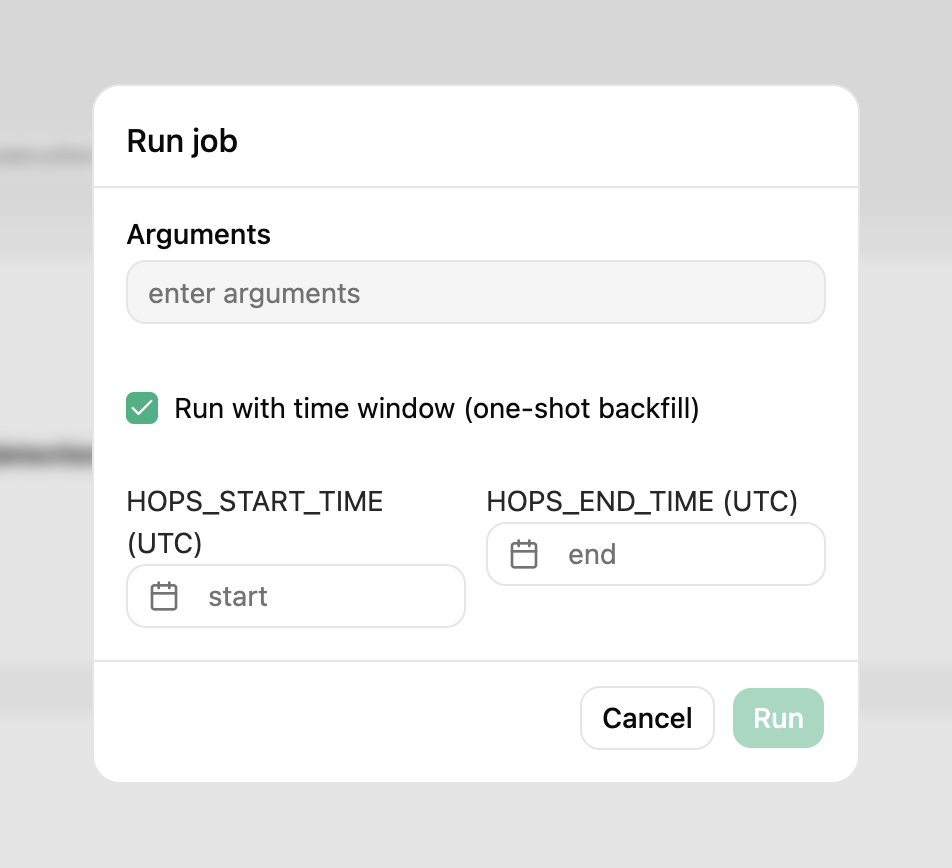
On the job's Run dialog, tick Run with time window (one-shot backfill) and pick the HOPS_START_TIME / HOPS_END_TIME datetimes (UTC). The execution is submitted with those env vars set; any schedule-derived values are overridden for this run.
From the Python SDK#
from datetime import UTC, datetime

import hopsworks


project = hopsworks.login()
job = project.get_job_api().get_job("my_feature_pipeline")

# Backfill March 2026
job.run(
    start_time=datetime(2026, 3, 1, tzinfo=UTC),
    end_time=datetime(2026, 4, 1, tzinfo=UTC),
)
Job.run() accepts the following optional logical-time kwargs:
| kwarg | Maps to |
|---|---|
start_time | HOPS_START_TIME + logical_date (data interval start) |
end_time | HOPS_END_TIME + data_interval_end |
logical_date | Override HOPS_LOGICAL_DATE independently (rare). |
env_vars | Arbitrary per-run env vars; highest precedence. |
Chained monthly backfill#
from datetime import UTC, datetime, timedelta

import hopsworks


project = hopsworks.login()
job = project.get_job_api().get_job("my_feature_pipeline")

start = datetime(2024, 1, 1, tzinfo=UTC)
end = datetime(2026, 1, 1, tzinfo=UTC)

cursor = start
while cursor < end:
    nxt = (cursor.replace(day=1) + timedelta(days=32)).replace(day=1)
    job.run(start_time=cursor, end_time=nxt, await_termination=True)
    cursor = nxt
Batched backfill at job creation#
When creating a new job in the UI, the Backfill card lets you split one window into N equal sub-windows and fire one execution per sub-window. Tick Run job on creation to have the sub-windows fired as soon as the job is saved:
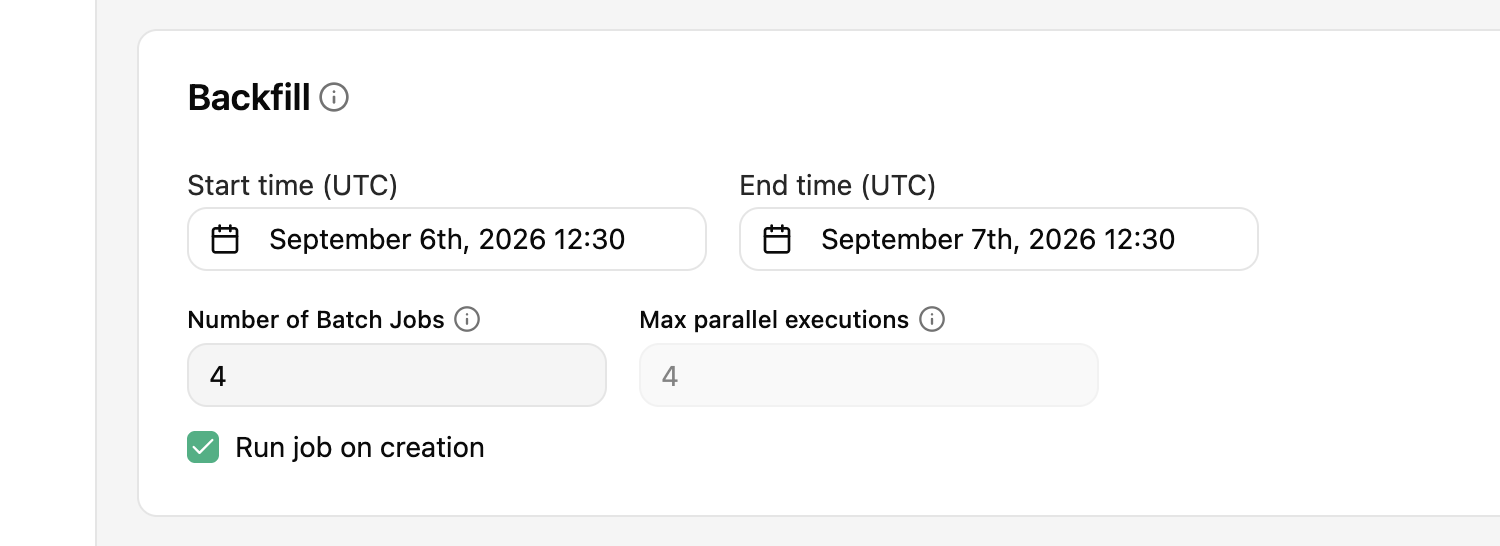
- Number of Batch Jobs: how many sub-windows.
[start, end)is tiled with no gaps or overlaps; the last sub-window absorbs any integer-division remainder so the union is exactly the original window.1means one execution covering the whole window (the default). - Max parallel executions: must be
≥ Number of Batch Jobstoday. Runtime concurrency enforcement (pause the next batch until a running one completes) is on the roadmap; until then the backend rejects smaller values with a400rather than silently over-firing. Setting it equal to the batch count fires everything in parallel.
Each sub-window run receives HOPS_START_TIME / HOPS_END_TIME for its slice, so the same pipeline code used by the incremental schedule works unchanged.
Precedence summary#
Several sources can set the same env var. The rule is "most specific wins":
- Per-execution env vars supplied to
job.run(env_vars=...)or the UI time-window dialog. - Job-config env vars (the Environment variables panel on the Advanced job form).
- Scheduler-computed
HOPS_*from the data interval + offsets. - Hopsworks defaults (e.g.
HADOOP_HOME).
So setting HOPS_END_TIME in the Environment variables panel pins it for every execution of the job; passing env_vars={"HOPS_END_TIME": "..."} to a single job.run() pins it only for that run.
See also#
- Schedule a job: full reference for cron + advanced scheduling fields.
- Python job / Spark job: adding generic env vars to a job configuration.