Adding extra configuration with generic bash commands#
Introduction#
Hopsworks comes with several prepackaged Python environments that contain libraries for data engineering, machine learning, and more general data science use-cases. Hopsworks also offers the ability to install additional packages from various sources, such as using the pip package manager and public or private git repository.
Some Python libraries require the installation of some OS-Level libraries. In some cases, you may need to add more complex configuration to your environment. This demands writing your own commands and executing them on top of the existing environment.
In this guide, you will learn how to run custom bash commands that can be used to add more complex configuration to your environment e.g., installing OS-Level packages or configuring an oracle database.
Prerequisites#
In order to install a custom dependency one of the base environments must first be cloned, follow this guide for that.
Running bash commands#
In this section, we will see how you can run custom bash commands in Hopsworks to configure your Python environment.
In Hopsworks, we maintain a docker image built on top of Ubuntu Linux distribution. You can run generic bash commands on top of the project environment from the UI or REST API.
Setting up the bash script and artifacts from the UI#
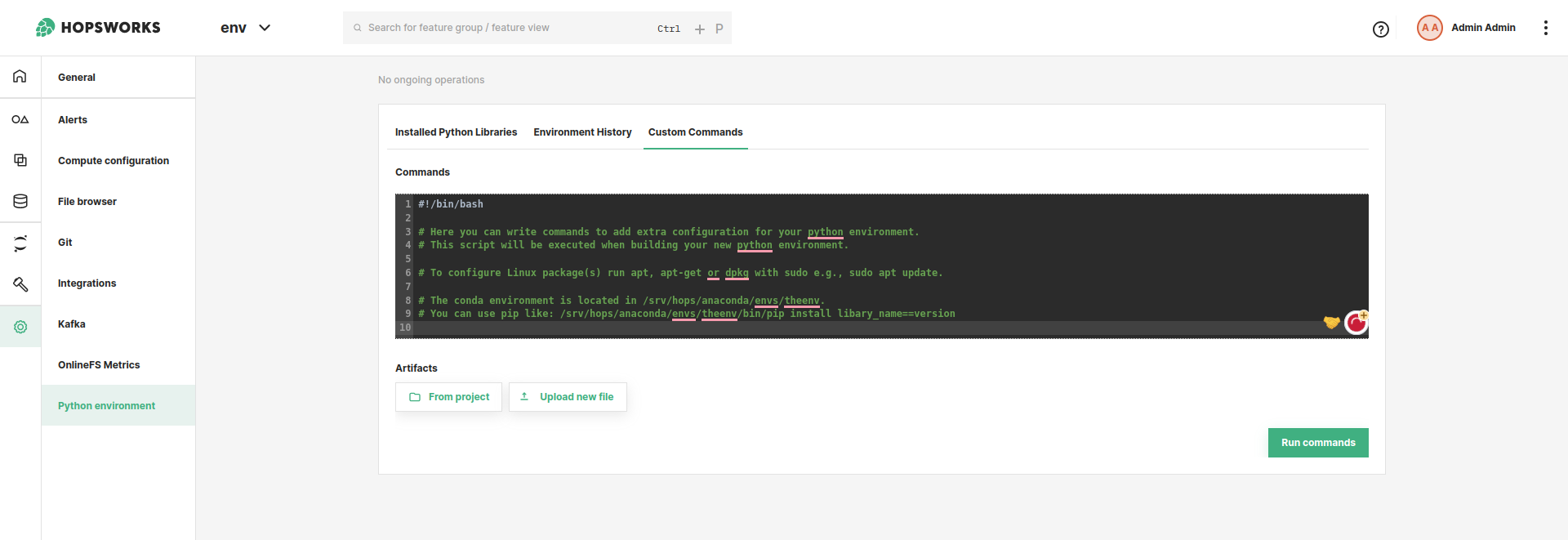
To use the UI, navigate to the Python environment in the Project settings. In the Python environment page, navigate to custom commands. From the UI, you can write the bash commands in the textbox provided. These bash commands will be uploaded and executed when building your new environment. You can include build artifacts e.g., binaries that you would like to execute or include when building the environment. See Figure 1.
Code#
You can also run the custom commands using the REST API. From the REST API, you should provide the path, in HOPSFS, to the bash script and the artifacts(comma separated string of paths in HopsFs). The REST API endpoint for running custom commands is: hopsworks-api/api/project/<projectId>/python/environments/<environmentName>/commands/custom and the body should look like this:
{
    "commandsFile": "<pathToYourBashScriptInHopsFS>",
    "artifacts": "<commaSeparatedListOfPathsToArtifactsInHopsFS>"
}
What to include in the bash script#
There are few important things to be aware of when writing the bash script:
- The first line of your bash script should always be
#!/bin/bash(known as shebang) so that the script can be interpreted and executed using the Bash shell. - You can use
apt,apt-getanddebcommands to install packages. You should always run these commands withsudo. In some cases, these commands will ask for user input, therefore you should provide the input of what the command expects, e.g.,sudo apt -y install, otherwise the build will fail. We have already configuredapt-getto be non-interactive - The build artifacts will be copied to
srv/hops/build. You can use them in your script via this path. This path is also available via the environment variableBUILD_DIR. If you want to use many artifacts it is advisable to create a zip file and upload it to HopsFS in one of your project datasets. You can then include the zip file as one of the artifacts. - The Python environment is located in
/srv/hops/anaconda/envs/hopsworks_environment. It is a virtualenv rather than a conda environment, and the path is unchanged so existing scripts keep working. You can install or uninstall packages in it using pip like:/srv/hops/anaconda/envs/hopsworks_environment/bin/pip install spotify==0.10.2. If the command requires some input, write the command together with the expected input otherwise the build will fail.
Installing a compiler#
The PyTorch and Ray environments contain a C and C++ compiler, since they compile code at runtime for torch.compile and for CUDA extensions. The other environments do not, because build-essential, and every Ubuntu -dev package, depends on the Linux kernel headers, which account for most of the vulnerabilities reported against the images and are never patched within an Ubuntu release.
In an environment without a compiler, a library that is published only as a source distribution fails to install:
× Failed to build `thriftpy2==0.5.2`
╰─▶ Call to `setuptools.build_meta:__legacy__.build_wheel` failed (exit status: 1)
    error: [Errno 2] No such file or directory: 'cc'
Install the compiler, build the library and remove the compiler again in the same script. The library keeps working, since what it needs at runtime are the shared libraries it links against, and the environment does not end up carrying the kernel headers.
#!/bin/bash
set -e

sudo apt-get update
sudo apt-get install -y build-essential

uv pip install --no-cache --python /srv/hops/anaconda/envs/hopsworks_environment/bin/python thriftpy2==0.5.2

sudo apt-get purge -y --auto-remove build-essential
sudo apt-get clean
Leave the purge out if you want to install more such libraries from the UI afterwards, or if the library loads a shared library owned by a -dev package you installed, since --auto-remove takes that with it. Do not purge in the PyTorch and Ray environments, where it would remove the compiler they came with.
Making custom-command builds faster#
A custom-command build repeats all of its work every time, including compilation and downloads that have not changed. Two things can be declared in the environment variables you supply alongside the script.
Both are read as build directives and never become environment variables in the image.
Note
Both need a cluster where an administrator has enabled the persistent BuildKit daemon. Without it there is nothing for a cache to survive in. See Python Environment Build Performance.
Caching a toolchain#
HOPSWORKS_BUILD_CACHE names the toolchain caches your script should get, comma separated:
| Name | Cached |
|---|---|
uv, pip | Python package downloads |
ccache, sccache | C and C++ compiler output |
maven, gradle | Java and Scala dependencies |
cargo | Rust crates and build output |
npm | Node packages |
go | Go modules |
Each one mounts a directory that survives between builds and points the tool at it. Your script does not need to configure anything; it just needs to use the tool normally.
This speeds up the work inside the step even though the step itself still re-runs. That is the point: a script that compiles a native extension pays the download and compile cost once rather than on every build.
Every cache is scoped to your project, and only one build in your project uses a given cache at a time, so two builds cannot corrupt a shared repository.
An unrecognised name fails the build and tells you which names are accepted, rather than being ignored.
Reusing the whole layer#
By default a custom-command build never reuses its previous result, because a script can fetch anything and nothing declares what it fetched. An unchanged script that installs curl | bash from a URL, or apt-get install from a moving repository, does not produce the same thing a month later.
If your script genuinely fetches nothing that can change, you can say so:
An unchanged script then reuses its previous layer outright, which takes the step to near zero.
Everything else about the step is already accounted for: the base image, your script, and your uploaded artifacts all change the result when they change. What you are asserting is the one thing the platform cannot check for you, which is that nothing your script reaches out to will change underneath it.
Warning
This only takes effect if your administrator has allowed such assertions on the cluster. If it has not been enabled, the setting is ignored and the layer is rebuilt as usual.
If you are not certain, leave it out and use HOPSWORKS_BUILD_CACHE instead. That speeds up the work without assuming anything about the outside world.
Referencing a secret#
A value in the environment variables file becomes an ENV instruction, which is image configuration: readable with docker inspect by anyone who can pull the image. To pass a credential to your script without it entering the image, reference one of your own Hopsworks secrets:
The value is mounted only for the step that runs your script and is exported into its environment. It never becomes an ENV, and it is not recorded in the image history.