Python Environments#
Introduction#
Hopsworks postulates that building ML systems following the FTI pipeline architecture is best practice. This architecture consists of three independently developed and operated ML pipelines:
- Feature Pipeline: takes as input raw data that it transforms into features (and labels)
- Training Pipeline: takes as input features (and labels) and outputs a trained model
- Inference Pipeline: takes new feature data and a trained model and makes predictions.
In order to facilitate the development of these pipelines Hopsworks bundles several python environments containing necessary dependencies. Each environment can also be customized further by installing additional dependencies from PyPi, Wheel files, GitHub repos or applying custom Dockerfiles on top.
Step 1: Go to environments page#
Under the Project settings section you can find the Python environment setting.
Step 2: List available environments#
The page is titled Prebuilt and Custom Container Images and lists the environments in three columns. Environments listed under FEATURE ENGINEERING correspond to environments you would use in a feature pipeline, MODEL TRAINING maps to environments used in a training pipeline, and INFERENCE / AGENTS / APPS are what you would use in inference pipelines, agents and applications.
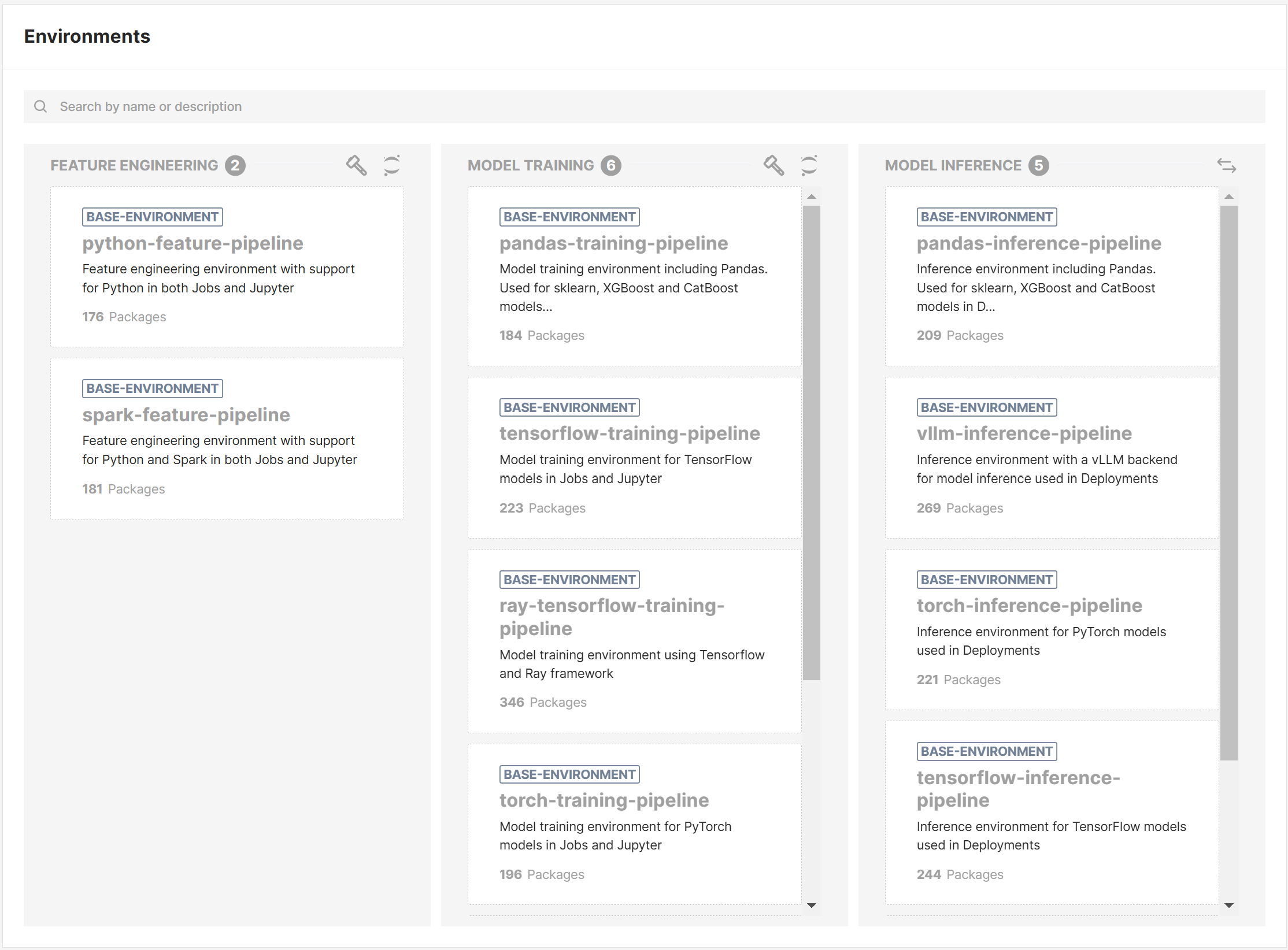
Python version
The python version used in all the environments is 3.13.
Feature engineering#
The FEATURE ENGINEERING environments can be used in Jupyter notebooks, a Python job or a PySpark job.
agent-joban AI agent runtime bundling Claude Code and OpenAI Codex, meant to be cloned and extended with your own librariesdlthub-ingestion-pipelinefor ingesting data from data sources into feature groupspython-feature-pipelinefor writing feature pipelines using Python, with Pandas and Polarsspark-feature-pipelinefor writing feature pipelines using PySparkdbt-pipelineextendspython-feature-pipelinewith dbt and the Trino and DuckDB adapters, for transformations written as dbt models
Model training#
The MODEL TRAINING environments can be used in Jupyter notebooks or a Python job.
tensorflow-training-pipelineto train TensorFlow modelstorch-training-pipelineto train and fine-tune PyTorch models and LLMspandas-training-pipelineto train XGBoost, Catboost and Sklearn models
Inference, agents and apps#
The INFERENCE / AGENTS / APPS environments can be used in a deployment using a custom predictor script, and for agents and applications.
tensorflow-inference-pipelineto load and serve TensorFlow modelstorch-inference-pipelineto load and serve PyTorch modelspandas-inference-pipelineto load and serve XGBoost, Catboost and Sklearn modelspython-agent-pipelineto build Python agents, bundling FastAPI, LlamaIndex and OpenTelemetrypython-app-pipelineto build interactive applications with Streamlitvllm-inference-pipelineto load and serve LLMs with vLLM inference engineminimal-inference-pipelineto install your own custom framework, contains a minimal set of dependencies
Next steps#
In this guide you learned how to find the bundled python environments and where they can be used. Now you can test out the environment in a Jupyter notebook.