Trino Catalogs#
A Trino catalog makes an external data source queryable from the query engine. Each catalog names a Trino connector and the properties that connector needs to reach the source, such as a connection URL and credentials. Once a catalog is live, its databases and tables can be queried from the SQL runner alongside your feature groups.
Navigate to Query Engine → Catalogs in your project to see the project's catalogs and your own private catalogs. The cluster's shared default catalogs are listed once you add Default to the Type filter. A catalog belongs either to the project or to you:
- A project catalog is named
<project>__<name>and is queryable inside the project. The project's Data Owners create, edit, delete and share it. - A private catalog is named
_<username>__<name>and follows you into every project you are a member of. Only you edit, delete or share it. See Private catalogs.
Only a Data Owner of the current project can create a catalog of either kind. A catalog is queryable outside its own project, or outside your projects for a private one, only once it is shared, as described in Sharing Catalogs and Feature Groups.
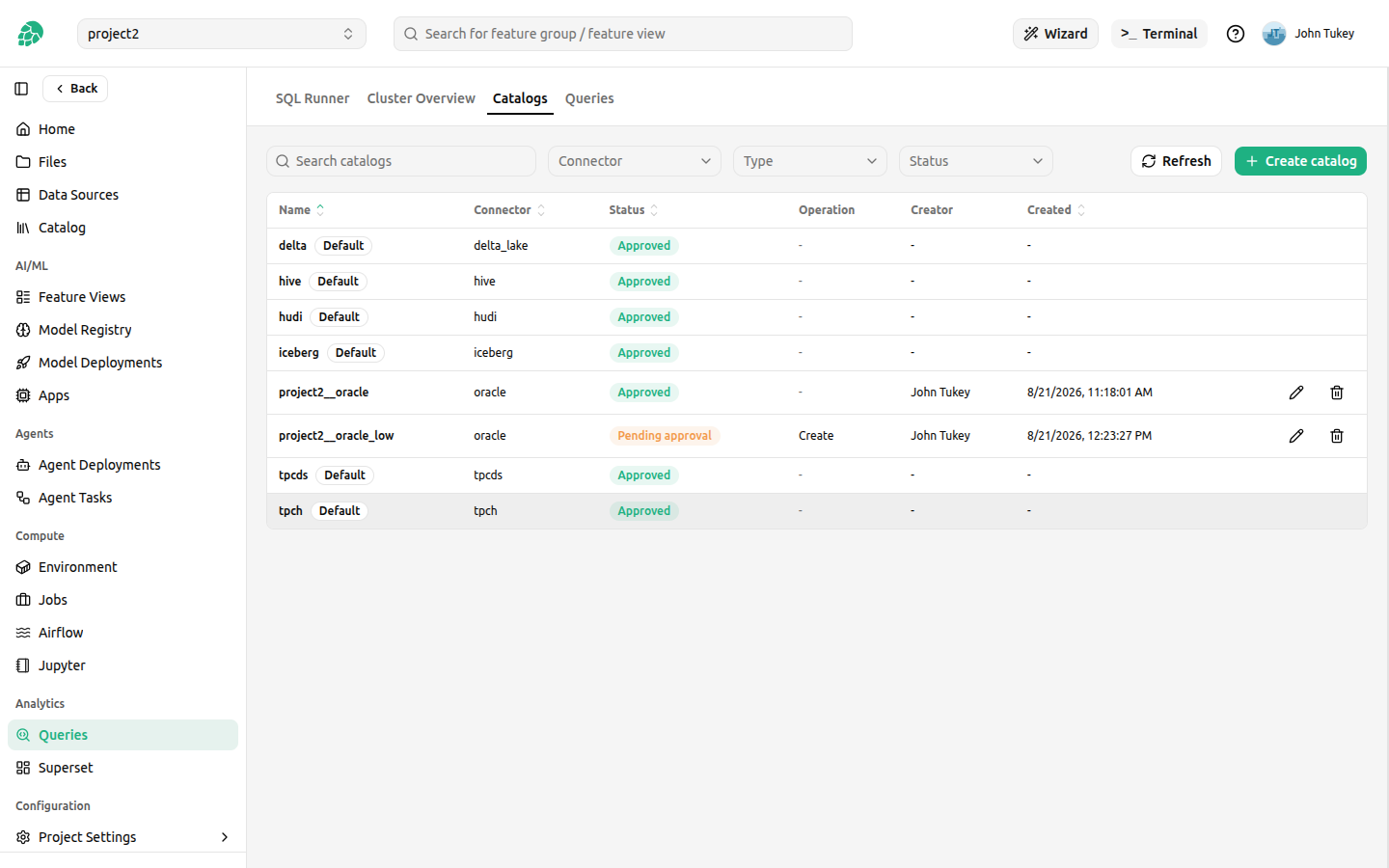
A catalog change is recorded immediately, but it reaches the query engine only when the engine restarts, because Trino reads catalogs at startup. When the catalog goes live covers when that happens and who can bring it forward.
Creating a catalog from a data source#
The recommended way to create a catalog is from a data source, because the data source already holds everything the catalog needs: the host, the database, and the credential. Hopsworks derives the connector type and properties for you, so you do not need to know the property names of the underlying Trino connector.
When you browse a data source's databases and tables to create an external feature group or ingest data, there are two ways in:
- A standalone Add Trino Catalog button on the configuration screen, which creates the catalog on its own, without creating or ingesting any feature group.
- An Add Trino Catalog checkbox on the review step, checked by default, which creates the catalog as the first step of setting up the feature groups.
Both are disabled with the reason when the data source cannot be mapped to a Trino connector, and show an Already added state when a catalog for this source already exists.
The catalog is created first, so you can review its properties before the feature groups and their ingestion are set up. The Create Trino Catalog dialog opens pre-filled with a suggested name, the connector type derived from the data source, and the connector properties derived from its settings. You can edit them and add any property the connector supports that the data source does not carry.
Credentials are references, not copies#
Credential properties are pre-filled as references rather than values. The credential is read from the data source server-side and stored as a secret owned by you, or as a bundle of files where the credential is a file, and the catalog keeps only the reference. An Oracle data source that authenticates with a wallet is delivered the second way: the bundle is built from the data source's own wallet, and the catalog's TNS_ADMIN property points at it.
No credential is ever sent to the browser, and rotating one stays a single operation on the secret rather than an edit of every catalog that uses it.
An Oracle data source with provided credentials is the exception: its catalog stores no login, and each query logs in with the querying member's own credentials, sent as Trino extra credentials. Such a catalog is always a private catalog of the member who creates it, and each member creates their own. The SQL runner and the Python client send them for you; other Trino clients must send them themselves. Creating such a catalog requires your own credentials for the data source, and its connection test runs as you. See Trino catalogs on a data source with provided credentials.
Creating a catalog by hand#
A source that has no Hopsworks data source is added by hand. Click Create catalog, give the catalog a short name, choose the connector, and write the properties one key=value per line. The <project>__ prefix is added for you.
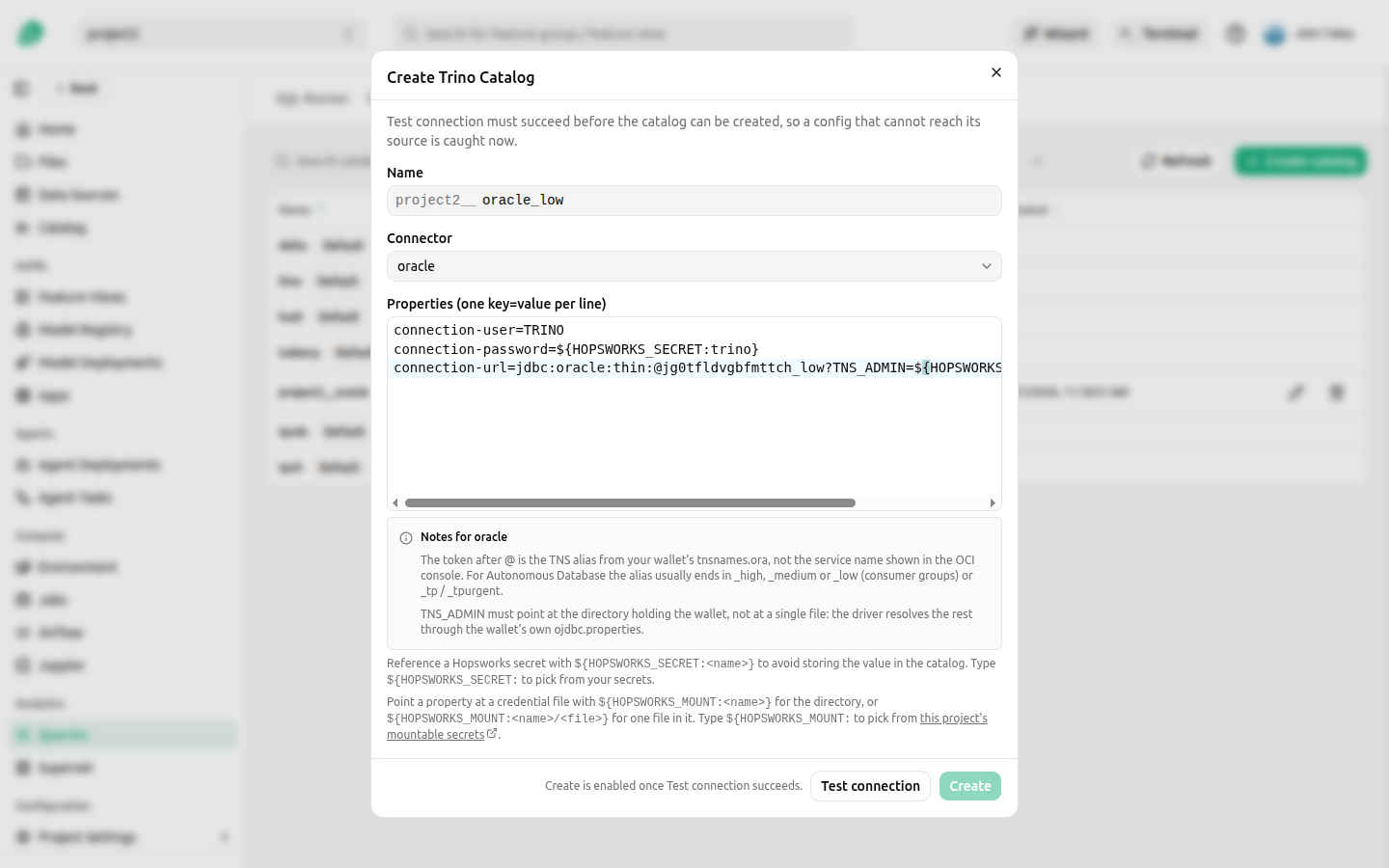
The picker offers every connector installed in the query engine, so a connector it does not list cannot be used:
bigquery, cassandra, clickhouse, delta_lake, druid, duckdb, elasticsearch, exasol, faker, gsheets, hive, hudi, iceberg, ignite, kafka, lakehouse, loki, mariadb, mongodb, mysql, opensearch, oracle, pinot, postgresql, prometheus, redis, redshift, singlestore, snowflake, sqlserver, trino_thrift.
Connectors that expose no external data source are rejected, because a catalog on one would either read the query engine's own internals or hold nothing: system, jmx, memory, blackhole, datasketches, ai, and the tpch and tpcds sample generators. The last two are already available to every project as shared catalogs.
Properties must address the data source over the network, for example jdbc:, thrift:, https: or s3:. A property that points at a file path on the query engine's own machines is rejected, because you cannot place files there and the only files such a path could reach belong to the cluster itself.
Two limits apply, because every project's catalogs share a fixed amount of storage in the cluster. A project may create a set number of catalogs, ten by default, and a single definition may not exceed a set size, 16 KiB by default, measured after any references are resolved. Both are cluster settings an administrator can raise, and neither is close to what an ordinary catalog needs: a few hundred bytes is typical. Property values must also be latin1 text, which is what the definition is stored as, so a credential containing characters outside it has to come from a Hopsworks secret rather than being typed into a property.
Referencing a credential instead of typing it#
Two reference forms keep a credential out of the stored catalog definition. Type ${ in the properties editor to pick from either.
${HOPSWORKS_SECRET:<name>}for a value, such as a password.${HOPSWORKS_MOUNT:<bundle>}or${HOPSWORKS_MOUNT:<bundle>/<file>}for a file, such as an Oracle wallet or a Java keystore. See Mountable Secrets.
A secret reference resolves against the secrets of the person who created the catalog, so you can only reference your own. Naming a colleague's secret does not work, even if you can both see the catalog. Two consequences follow. A referenced secret cannot be deleted while a catalog still uses it, and the catalog keeps working after you leave the project only if the secret still exists. If a catalog needs to outlive your account, have someone recreate it under theirs.
Only secrets created from typed text can be referenced
A secret created by uploading a file holds the base64 encoding of that file's contents, not the contents themselves. A reference to such a secret puts that base64 text into the catalog, and the connector then fails, because it receives an encoded string where it expects a password, a key, or a JSON document. Nothing records how a secret was created, so Hopsworks cannot detect the case and decode it for you, and the resulting error comes from the connector rather than from Hopsworks.
Create the secret by typing or pasting the value as text when you intend to reference it from a catalog. For a credential that is naturally a file, use a mountable secret instead.
Private catalogs#
Choose Private as the owner when creating a catalog to make it yours rather than the project's. The name prefix becomes _<username>__, for example _meb10000__sales, and the catalog is listed in every project you are a member of.
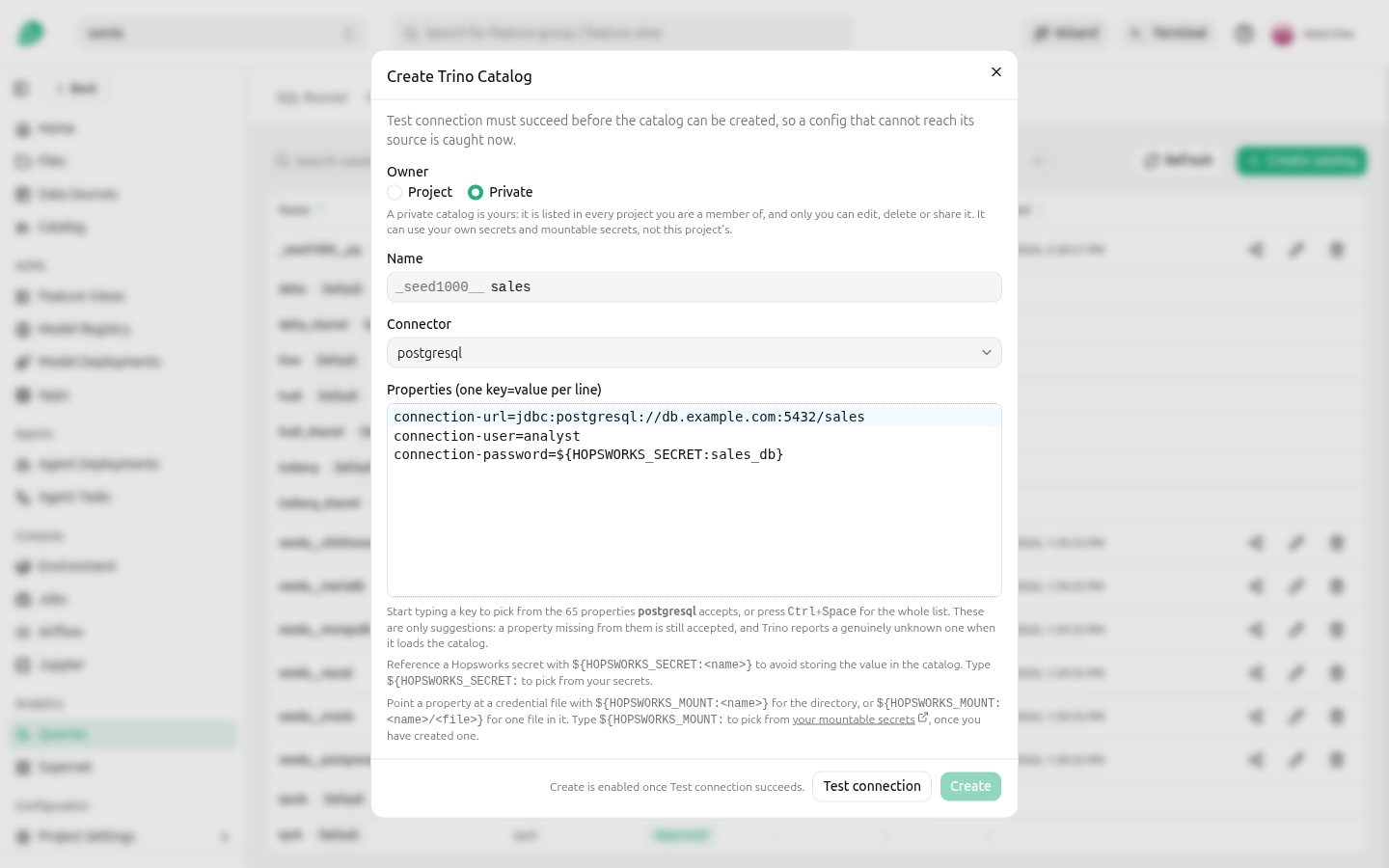
A private catalog differs from a project catalog in what it can reach and who controls it:
- It can reference only your own Hopsworks secrets and your own mountable secrets, which you manage under Account Settings → Secrets. A project's mountable secrets are not available to it, because the catalog would carry them into every other project you are a member of. See Mountable secrets for private catalogs.
- It cannot be created from a data source, because a data source's credential belongs to the project. Enter the connection details yourself instead. A data source with provided credentials is the exception: its catalog is always private, reads with your own credentials, and cannot be shared.
- Only you can edit, delete or share it, from any of your projects and whatever your role there, so being made a Data Scientist in a project does not lock you out of your own catalogs. Other members of your projects cannot query it unless you share it with their project.
- You write to it only from a project where you are a Data Owner, and read it from any other. In a project where you are a Data Scientist you can only read that project's data, and a private catalog writable from there would let you copy the data into a catalog you then read from your other projects.
- The number of private catalogs you can own has the same limit as a project's catalogs, ten by default.
When your account is deleted, your private catalogs are marked for removal and stop being queryable at once, and their shares are removed with them. They stay denied to everyone, including a later account with the same username, until they are removed like any deleted catalog, as described in When the catalog goes live.
Testing the connection#
Create stays disabled until Test connection succeeds, so a catalog that cannot reach its source is caught now rather than after a restart. The test creates a temporary catalog on the cluster's test coordinator, lists its schemas, and reports the result.
A failed test shows the query engine's own error, which is what says how to fix the properties.
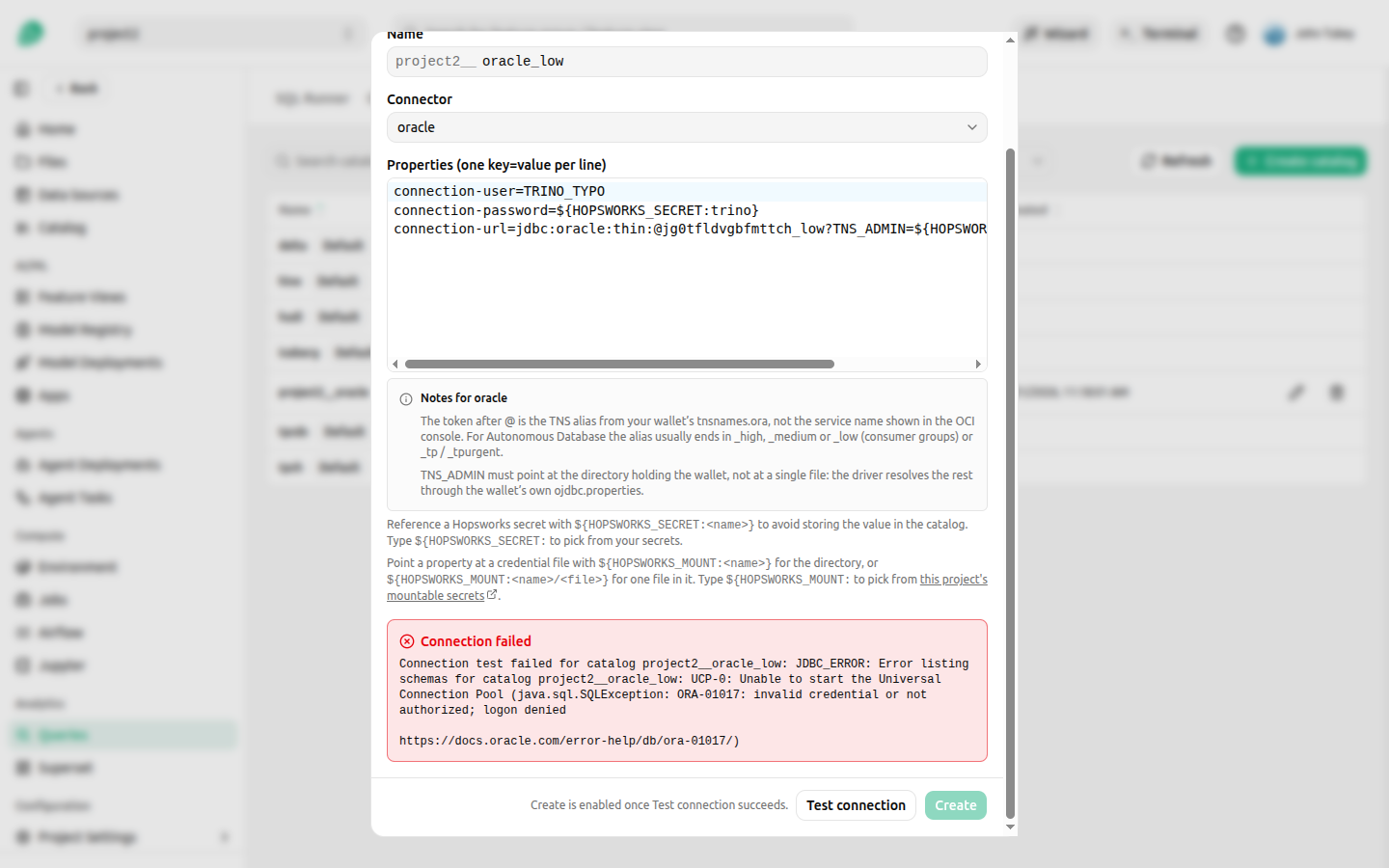
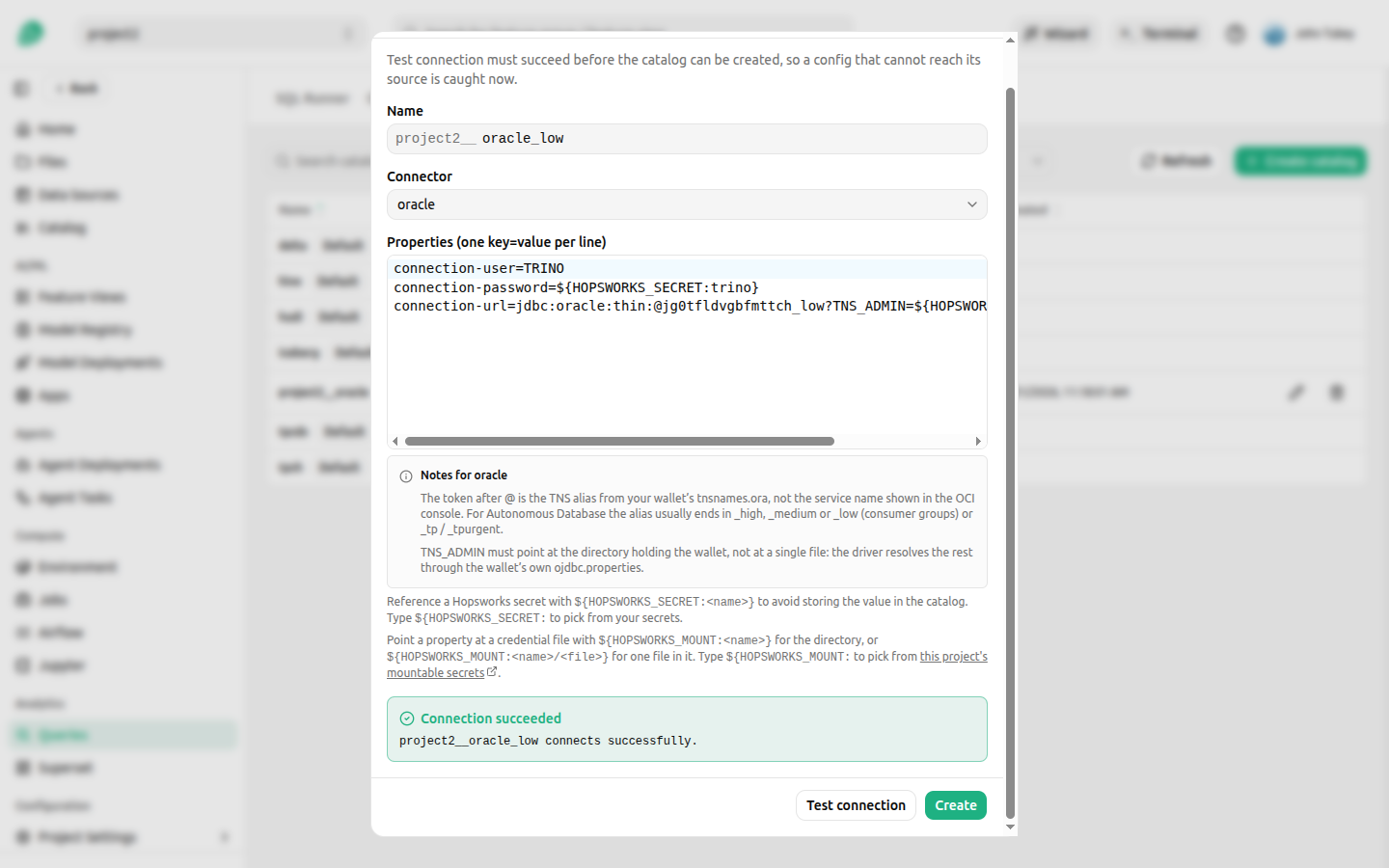
On a cluster where the administrator has turned the test coordinator off, the test reports that testing is unavailable and Create is enabled without it.
When the catalog goes live#
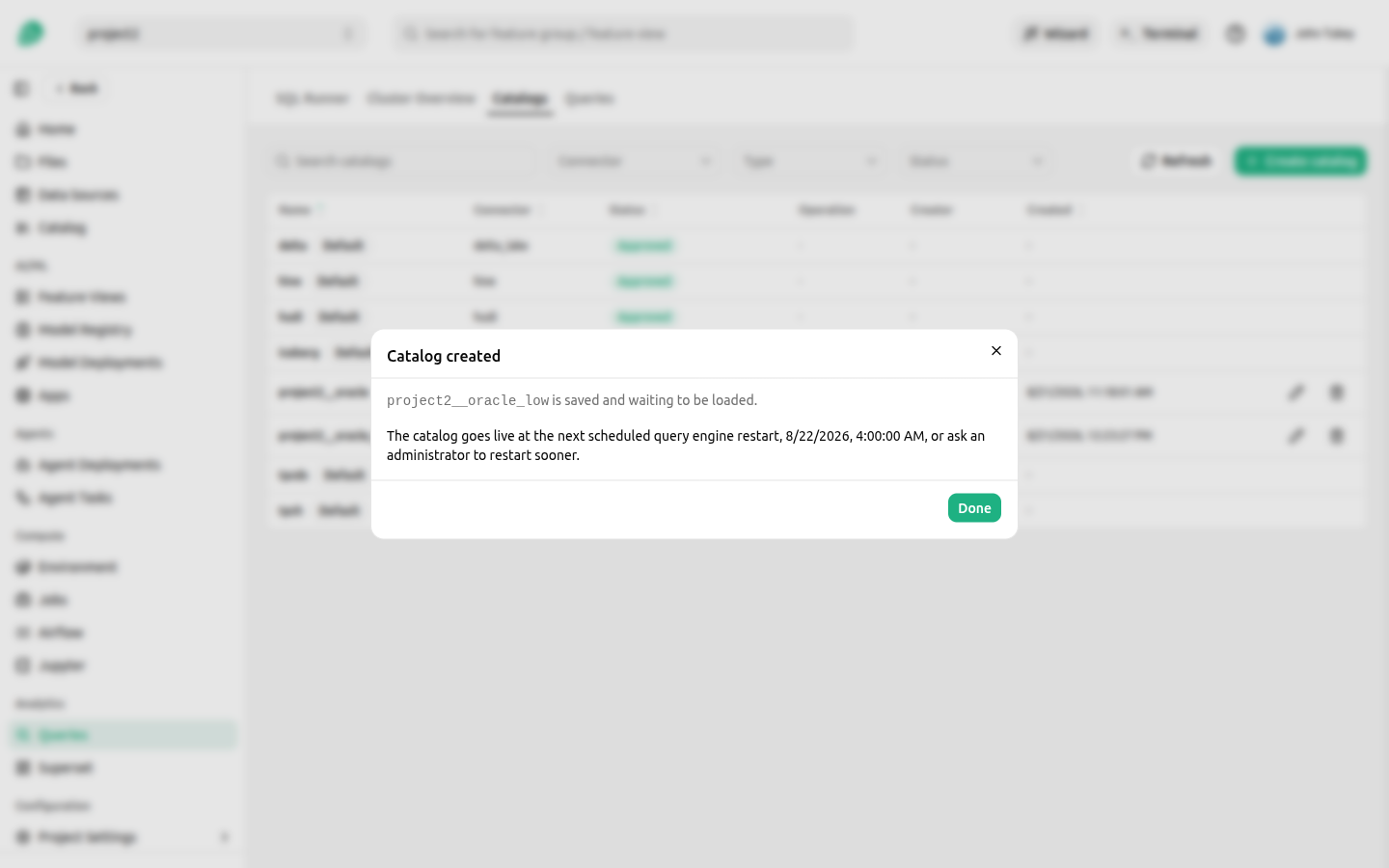
A new catalog is saved with the status Pending approval. It does not appear as a target in the SQL runner until the query engine restarts and loads it. The Catalog created dialog says when that happens, and what it says depends on whether you can restart the query engine yourself.
A project user is told the next scheduled restart, in their own timezone.
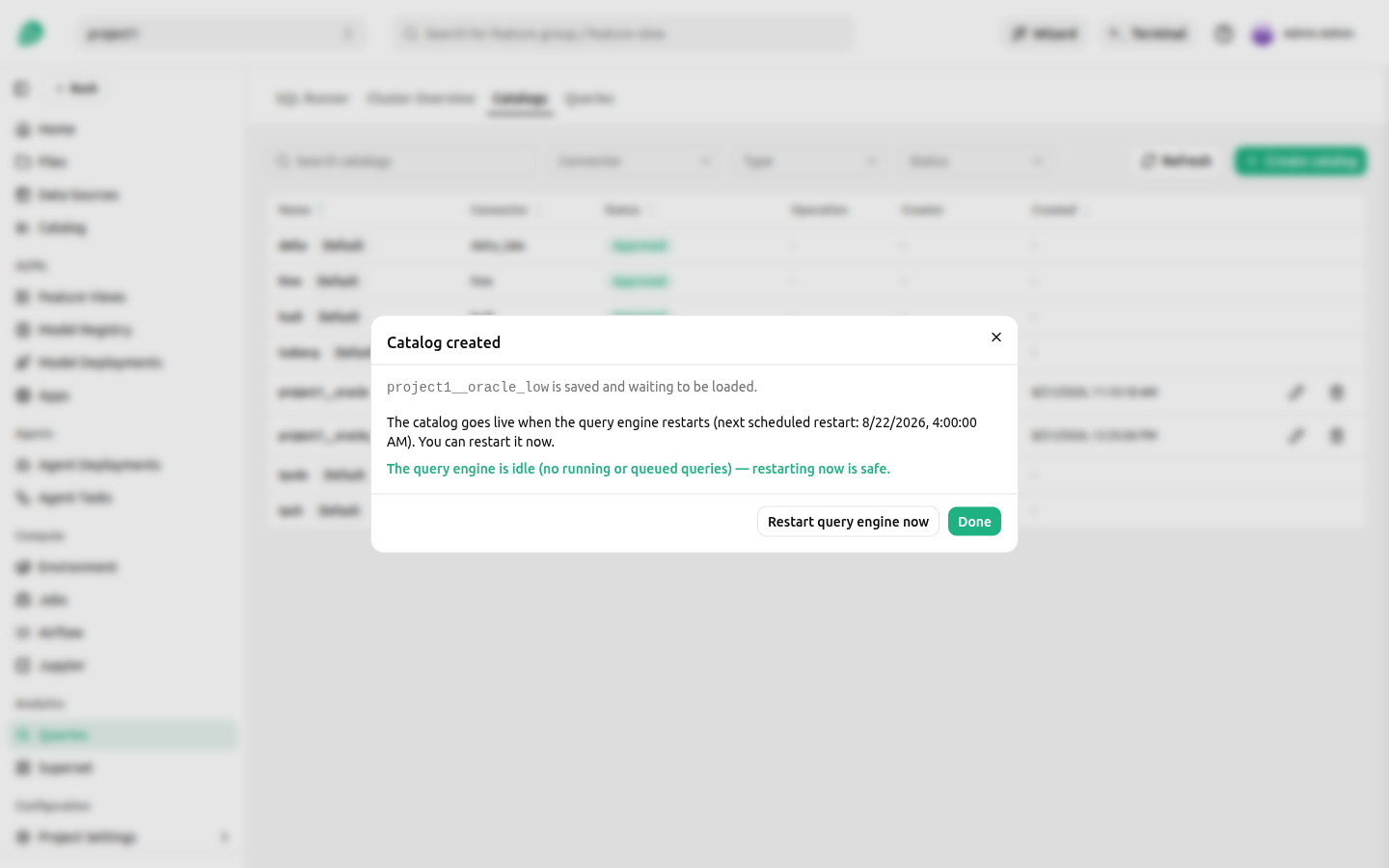
A cluster administrator is offered Restart query engine now instead, together with the number of queries currently running and queued. A restart cancels those queries everywhere on the cluster, so the dialog reports the activity to let the administrator judge whether restarting now is safe.
Two cluster settings change this. Where the administrator has enabled an eager restart, the dialog also says the catalog may go live earlier than the scheduled time, because the query engine restarts as soon as it is idle while changes are pending. Where the administrator has instead required approval for all catalog changes, there is no schedule at all, and the dialog says to ask an administrator. Both are described in the administrator guide.
Deleting a catalog follows the same path in reverse. The catalog is marked Pending removal immediately, and stops being queryable at the next restart, because a running query engine keeps the catalogs it started with. A catalog you have deleted can therefore still answer queries for a while.
Editing one works the same way: the stored definition changes at once, and the loaded catalog changes at the next restart. Secret-bearing property values come back masked, and a masked value left unchanged keeps the stored secret, so you do not retype credentials to change an unrelated property.
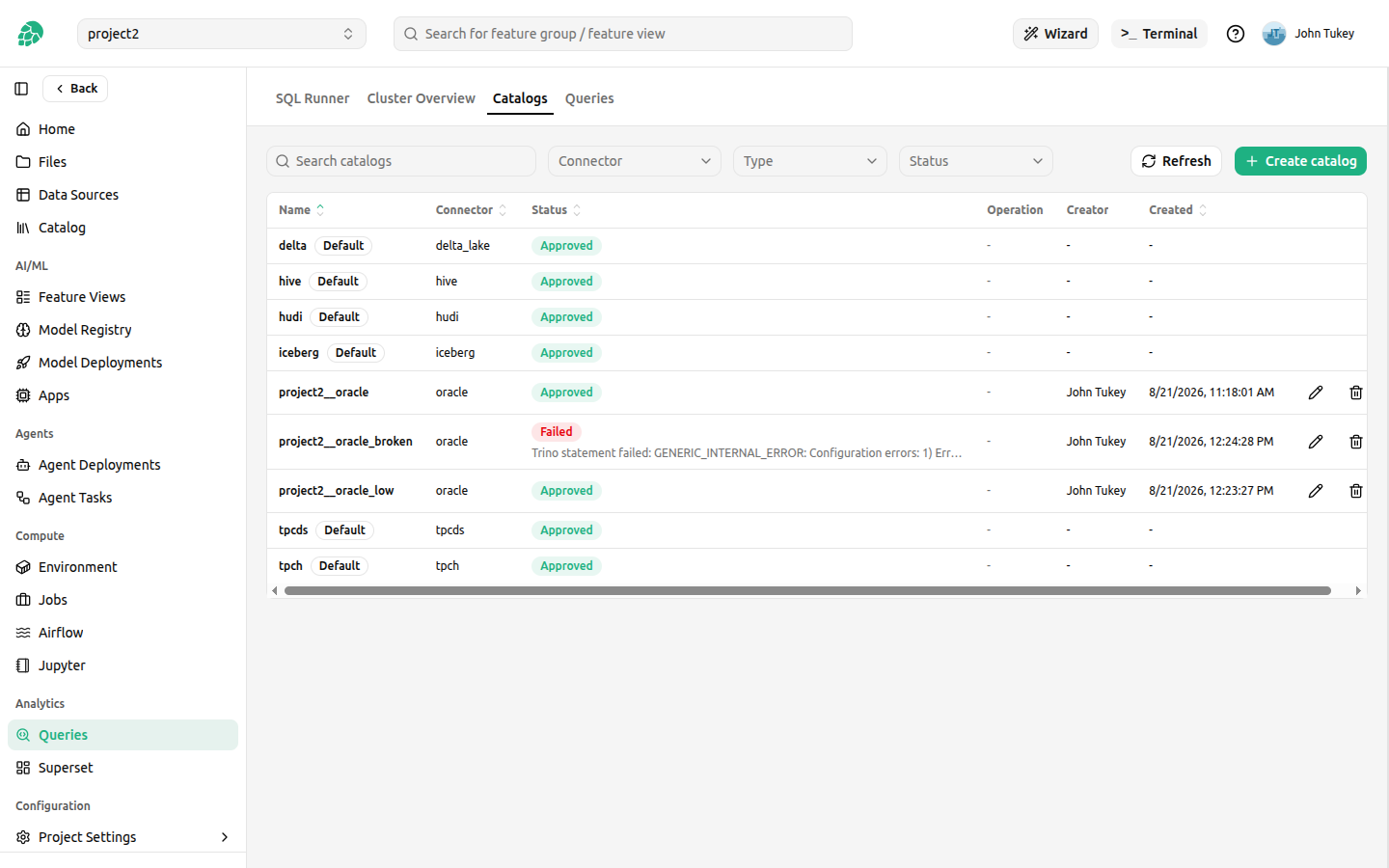
The Catalogs tab shows where each catalog stands.
| Status | Meaning |
|---|---|
| Approved | Loaded by the query engine and queryable. |
| Pending approval | Saved, not yet written for the query engine. |
| Pending restart | Written, waiting for the restart that loads it. |
| Pending removal | Deleted, still loaded until the next restart. |
| Failed | The query engine could not load it. See below. |
When a catalog fails to load#
A catalog can be valid to save and still be rejected by the query engine, for example when a property name is not one the connector accepts. The query engine reads catalogs only at startup and refuses to start if it cannot load one, so such a catalog is removed from the engine automatically and marked Failed, which keeps the query engine available for everyone.
The status carries the error the query engine reported, which says what to correct. Edit the catalog to fix the definition, and it returns to Pending approval and follows the normal flow again. Testing the connection before saving catches most of these earlier.
Who can query a catalog#
Inside the project that owns a project catalog, its Data Owners can read and write, and its Data Scientists can read. A private catalog can be read by you from any of your projects, and written only from a project where you are a Data Owner.
Other projects can read a catalog only through a share, which grants read access to the whole catalog, one schema, one table, or some columns of a table, optionally with masked values. See Sharing Catalogs and Feature Groups.
The query engine reads the external system as the database user in the connection credentials, so no share can expose more than those credentials allow. A catalog on a data source with provided credentials reads as its owner's own database user instead. Scoping that database user at the source remains the strongest limit on what a catalog can reach.
A Data Owner of the project can also run a JDBC catalog's system.query table function, which passes a query to the source database as that database user. The query engine sends it as a subquery, so the database rejects a statement that changes data, but a database function that changes data as a side effect still runs. Give the database user only the privileges the catalog's Data Owners should have. The receiving project of a share cannot run the catalog's functions at all.
Read access to an Iceberg or Delta Lake table also allows its table procedures, ALTER TABLE ... EXECUTE with optimize, expire_snapshots, remove_orphan_files or rollback_to_snapshot, because the query engine does not check them against the access rules. A Data Scientist of the project can therefore rewrite, expire or roll back the tables of the project's Iceberg and Delta Lake catalogs, and so can you on your private catalog from a project where you are a Data Scientist, although neither can write rows. Set the connector's iceberg.security or delta.security property to read_only on a catalog that must not be changed this way; the query engine then refuses table procedures to everyone and reading is unchanged. CALL procedures, such as system.unregister_table, are refused to everyone.
Creating a catalog from the Python client#
The same operations are available from the Python client, so making a data source queryable can be scripted from a job or a notebook.
import hopsworks


project = hopsworks.login()
fs = project.get_feature_store()

sc = fs.get_data_source("my_snowflake_db").storage_connector

template = sc.get_trino_catalog_template()
if template["supported"]:
    catalog = sc.create_trino_catalog()
    print(catalog["name"], catalog["status"])
else:
    print("cannot be mapped:", template["reason"])
get_trino_catalog_template() returns the proposal without creating anything, so it can be reviewed or adjusted first. create_trino_catalog() accepts an optional name and a properties override, and tests the connection before creating where the cluster supports it, so an unreachable source raises before the catalog exists. Credentials are resolved server-side into references exactly as in the UI path.
The full catalog lifecycle is available on the project:
import hopsworks


project = hopsworks.login()
catalogs = project.get_trino_catalog_api()

for catalog in catalogs.get_catalogs():
    print(catalog["name"], catalog["status"])

print(catalogs.get_capabilities()["nextScheduledRestart"])
A cluster administrator can apply every pending catalog change immediately instead of waiting for the schedule:
import hopsworks


project = hopsworks.login()
catalogs = project.get_trino_catalog_api()

result = catalogs.restart()
print(result["restarted"], result["quarantined"])
The restart interrupts queries running anywhere on the cluster, so prefer waiting for the scheduled restart unless the change is needed sooner.